Automating Release notes writing with AI: Docuwiz MCP
Most AI-generated release notes are polished engineer-speak, not user communication. Here's the extraction framework, the right questions, and the prompt that fixes it — plus how to automate the full workflow with Claude and Docuwiz MCP.

Team Docuwiz
Documentation Experts
9 min read

Sign Up for Docuwiz
Experience the magic of collaborative documentation with Docs-As-Code Workflow
Here is what most software release notes look like:
v2.4.1 — Bug fixes and performance improvements.
This entry tells users nothing. It does not say what was broken, what is now fixed, whether the product behaves differently, or whether anyone needs to do anything. It was written by someone who ran out of time, pulling from Jira ticket titles meant for engineers reviewing a diff — not for users trying to understand what changed in something they rely on every day. Adding AI to that process without fixing the underlying structure does not produce better release notes; it produces the same vague summaries, faster, at scale.
This post covers how to fix the structure first — the right categories, the right questions, and the right extraction workflow — and then how to automate the whole thing using Claude and Docuwiz MCP so the automation actually produces something worth publishing.
What Technical Writers Need to Gather Before AI Can Help
The people who understand what shipped are engineers. The people who understand how users think about the product are PMs and support teams. The people who can write clearly for a non-technical audience are technical writers or marketers. In most organizations, these three groups never overlap at release time which is why release notes end up written by whoever is closest to the deployment pipeline and least equipped to explain user impact.
Technical writers sit at the intersection of those two worlds, It is also why the context tech writers gather before touching AI is the most important step in the entire workflow. The quality of any AI-assisted release note is capped by the quality of the raw material you feed it, and that material rarely arrives in a usable form.
It helps to remember who actually reads release notes. As Emmanuel Quartey writes in Product Notes:
"Release notes reach a self-selected group of some of your most valuable supporters — users who update immediately, read what changed, and are primed to share their opinions with others."
Adam Sigel, VP of Product at Hometap, puts the stakes plainly: "Most people don't read them, but those that do represent a highly targeted audience of very engaged users." You are writing for a small audience, but that is a reason to write more carefully, not less — every reader is a power user whose opinion carries weight.
The Extraction Problem Has Two Parts

Technical context lives in the wrong format
Commit messages are written for engineers reviewing diffs. A line like fix: null pointer exception in auth middleware is perfectly clear to the person who wrote it and meaningless to everyone else. A user does not know what auth middleware is; they only know they were sometimes logged out unexpectedly. The commit captures the internal cause, never the user-facing symptom — and the gap between those two is precisely the work a technical writer exists to do. Bridging it requires context that simply does not live in the commit log.
Context is distributed and fragile
By the time someone sits down to write release notes, the PR has been merged, the Slack thread has scrolled away, and the engineer who built the feature has moved on to the next thing. The information you need exists somewhere, but it is scattered across systems that were never designed to hold it together, and it decays quickly. The fix is not writing faster. It is a structured extraction process that pulls user-impact information out of wherever it currently lives, backed by a specific set of questions that make that extraction repeatable.
A related decision is cadence. Release notes can ship per sprint, per milestone, or continuously, and the right rhythm depends on how your team releases. Sprint-based publishing (typically every two weeks) tends to be the most sustainable for teams running agile cycles, while milestone-based notes suit products that release infrequently but significantly. Continuous, per-change notes only work if every entry carries genuine user-facing value — otherwise they become noise. The right frequency is simply the one you can sustain at a quality worth reading.
Without the Right Context, AI Just Writes Faster Engineer-Speak
Large language models are genuinely good at the mechanical parts of this job: parsing structured text, clustering related changes, holding a consistent voice across dozens of entries, and turning a list of inputs into clean prose. What they are not good at, by default, is identifying user impact from technical source material — and that is the part that actually matters.
Feed Claude or any other model a raw git log and ask it to write release notes. What comes back will be grammatically clean, consistently formatted, and almost entirely useless to users. The model is doing exactly what you asked — summarizing the commits — but commits describe what the code does, not what users experience. The output is polished engineer-speak, not user communication.
The missing piece is a translation layer, and the technical writer is the one who builds it. In practice that means three things: a structured prompt that maps technical changes onto user-facing impact categories, source material that already carries some user-facing context rather than bare commit titles, and a review pass that catches anything still written for engineers. Without that layer, AI automation is just a faster path to the same bad output. The sections below build it, first the categories, then the questions, then the prompt itself.
The Three-Category Framework: Features, Updates, and Bug Fixes
The flat, date-sorted changelog is the default format because it is the easiest thing to generate from version control. It is also not what readers want. Anyone who opens release notes is usually trying to answer one of three questions: is there something new I should learn, has something that was bothering me been fixed, or has something I rely on changed in a way that demands action? A list sorted by date forces them to scan every entry to figure out which bucket it belongs in. A categorized format lets them jump straight to what they care about.
Practitioners who have studied this converge on the same answer. Rob Gill, product designer at Provius, describes the three-category structure( New Features, Improvements, and Fixed Issues ) as "the baseline for well-designed release notes." Sarah Maddox, technical writer at Google, lands in nearly the same place with New Features and Products, Bug Fixes, Upgrade Guides, and Deprecations. The consensus is consistent: categorize by type, not by timestamp. Here is what belongs in each bucket.
Features (New Capabilities)
Features earn the most words. Explain what the capability does, who it is for, and where in the product to find it — a bare "Added dark mode" leaves the reader to discover all of that on their own. The difference between an unhelpful entry and a useful one is concreteness:
Instead of this | Write this |
|---|---|
"Added dark mode" | "You can now switch to dark mode from Settings > Appearance. Dark mode respects your OS-level preference automatically." |
"Added export options" | "You can now export any report as CSV or PDF from the toolbar. Exports include all applied filters." |
Updates and Improvements
This is the trickiest category, because "update" can mean anything from a cosmetic tweak to a behavioral change that quietly breaks an existing workflow. Be specific about what changed and flag anything that requires user action. "We've updated how notifications are grouped — messages from the same thread now appear under one notification instead of separately" tells a user exactly what to expect; "Improved notification handling" tells them nothing. When a change could disrupt how someone already works, mark it plainly with an [ACTION REQUIRED] tag at the start of the entry so skimmers do not miss it.
Bug Fixes
The rule for bug fixes is simple: describe what users experienced, not what the code did. "Fixed an issue where attachments over 10MB failed silently without an error message" resonates with anyone who hit that wall, while "Fixed null pointer exception in file upload handler" speaks only to the person who wrote the patch. Where you can, Maddox recommends linking fixes to publicly visible tracker tickets — it signals transparency and confirms to affected users that their report was heard.
On Version Numbers and Release Summaries
If your product follows Semantic Versioning, the version number itself is a signal worth surfacing in the release header: a major bump (2.0.0) warns of breaking changes, a minor bump (2.1.0) introduces features without breaking anything, and a patch (2.1.1) means bug fixes only and a safe update. Pairing that with a one- to two-sentence summary at the top of each release gives readers an instant read on scope before they decide how deeply to engage. The Slack team framed the goal as notes that "contain real value, useful information, and the opportunity to connect a little bit, human to human, with the people who use Slack the most" — a standard that begins with genuinely knowing what users want from each update, which is the technical writer's job to capture.
The Questions That Extract User-Impact Information
Whether you are interviewing engineers, reading PR descriptions, parsing ticket summaries, or feeding raw commits into a model, the same questions surface user-facing information from technical source material. They are the single most reusable artifact in this whole process — the same checklist works in a human debrief, a required PR template field, or an AI extraction prompt. Run them against every change.
For every change:
What did users experience before this change? (Describe the symptom, not the internal cause.)
What do users experience now?
Does this require any user action — migration, settings change, re-authentication, workflow adjustment?
Who is affected — all users, specific plan tiers, specific platforms or OS versions?
Is there a known edge case or limitation worth documenting?
For bug fixes specifically:
What did users see or experience when they hit this bug?
Were there workarounds in common use that users can now stop using?
How long had this been broken?
For features specifically:
What is the simplest one-sentence description of what this does?
What problem does it solve, or what workflow does it enable?
Where in the product does the user find this?
Is this behind a feature flag, plan tier, or early-access program?
In the next section, these questions become the scaffold of the prompt itself.
From Raw Commits to Published Changelog: The AI-Assisted Workflow
The ideal workflow has four stages — gather inputs, extract user-facing information, review for accuracy and framing, and publish — and the bottleneck is almost always extraction, not writing. Here is how each stage plays out in practice.
Step 1: Gather your raw material
Collect whatever you have: PR descriptions from your release branch, ticket titles and descriptions from Jira or Linear, a plain-text note from your team on what shipped this sprint, or a git commit log (git log v1.3.0..v1.4.0 --oneline). Paste it into Claude as context. More context is better here, even if it is messy — the next step is where it gets shaped.
Step 2: Use the extraction prompt
This prompt applies the questions from the previous section and imposes the three-category structure:
Step 3: Review against the user-impact standard
Read every entry and ask one question: would a user who does not know the codebase understand why this matters to them? Wherever the answer is no, rewrite it, and flag anything that still reads as internal technical language. This pass takes about five minutes, and it is what separates a usable draft from a publishable one — the AI output is a starting point, never the final product.
Step 4: Publish with Docuwiz MCP
Docuwiz MCP connects Claude directly to your documentation workspace, which removes the copy-paste-into-CMS step that breaks every other AI writing workflow. Setup takes under two minutes:
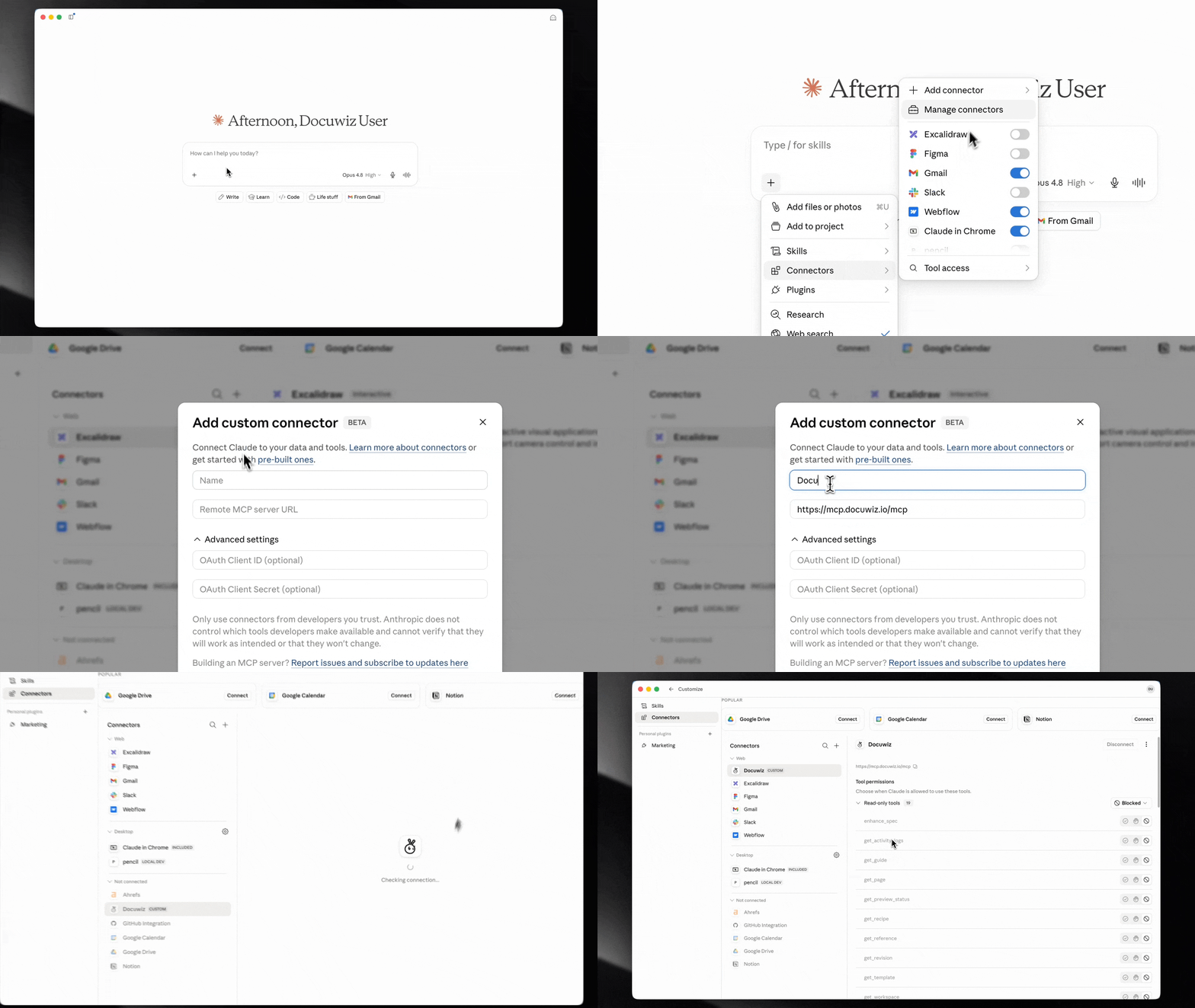
Open Claude Desktop.
Click the + icon in the sidebar > Connectors > Add Custom Connector.
Name the connector
Docuwizand set the server URL tohttps://mcp.docuwiz.io/mcp.Save and authenticate with your Docuwiz credentials.
Once connected, Claude can create pages, add revisions, organize content into categories, and publish — all through the same conversation where you drafted the notes. The full loop, from raw commits to a published changelog, runs without ever switching tabs or reformatting content for a CMS. The shift looks like this:
Before (manual) | After (AI + Docuwiz MCP) |
|---|---|
Engineer pastes Jira titles into a doc | Claude parses PRs and clusters changes automatically |
PM rewrites in plain language (30-60 min) | Extraction prompt produces user-facing draft (under 5 min) |
Copy-paste into CMS, fix formatting | Publish command in the same Claude conversation |
Release delayed until notes are done | Notes drafted while deployment runs |
Frequently Asked Questions
What should be included in release notes?
Release notes should cover new features (with their location in the product and the benefit to the user), updates to existing functionality — especially anything that changes how the product behaves — and bug fixes described by their user-facing symptom rather than their internal cause. For larger releases, add upgrade instructions where action is required and deprecation notices for anything being removed. Every entry should answer three things: what changed, how it affects the user, and whether the user needs to do anything.
What is the difference between a changelog and release notes?
A changelog is a technical, developer-facing record of every change made to a codebase, including internal refactors and dependency updates with no user-facing effect. Release notes are a curated subset of that record, written in plain language for users — only the changes that affect how they experience the product. Changelogs are for maintainers; release notes are for users.
Is there a release notes template I can use?
The most effective template follows the three-category structure: a one- to two-sentence summary, then New Features, then Updates and Improvements, then Bug Fixes, with each entry running one to three sentences. The extraction prompt in this post is a copy-pasteable starting point that works with raw commits, PR descriptions, or ticket summaries as input.
How do I automate release notes from Git commits?
Automate in two stages, not one. First, use the extraction prompt to have a model parse your commits and categorize them by user-facing impact. Second, review the output against the user-impact standard. Going straight from git log to AI to publish, with no human review, produces accurate technical summaries rather than user-friendly notes — the review step is what makes the automation worth doing.
How often should you publish release notes?
For most teams, a sprint-based (every two weeks) or milestone-based cadence is the most sustainable. Daily or per-commit notes tend to fatigue users and are hard to maintain at quality. One specific, well-written set of notes every two weeks consistently outperforms a daily feed of generic entries.
How long should release notes be?
Long enough to cover every user-affecting change, short enough that a power user can read the whole thing in under two minutes. Rob Gill recommends leading with a summary for readers who want the short version, then offering full detail below for those who want it. Sarah Maddox's standard at Google is "lean and information rich" — if a change has no user-facing impact, it does not belong in release notes at all.
Published by Docuwiz. Docuwiz is an AI-powered documentation platform with an MCP server that connects Claude directly to your documentation workspace.
Written by
Team Docuwiz
Documentation Experts
The Docuwiz team helps developer-focused companies build documentation their users actually love — from API references to onboarding guides and everything in between.