Introduction
Most documentation workflows have the same problem: writing and managing docs is slow, manual, and always a step behind development. You open a UI, navigate to the right section, update a spec, fix a page, and publish. Then you do it again for the next change.
AI-powered documentation with Claude MCP removes that friction. Docuwiz MCP is a Model Context Protocol server that gives Claude direct access to your Docuwiz workspace. Instead of navigating a UI, you describe what you need in plain language, and Claude handles the tool calls. Import a spec, create a guide, publish a version, or scan a public repo — all through conversation.
This guide covers every capability in Docuwiz MCP through real scenarios and ready-to-copy prompts. Each section lists the tools involved, describes a concrete situation, and shows exactly what to type and what to expect back.
How to Connect Docuwiz MCP to Claude
Connecting takes under two minutes. No developer setup required.
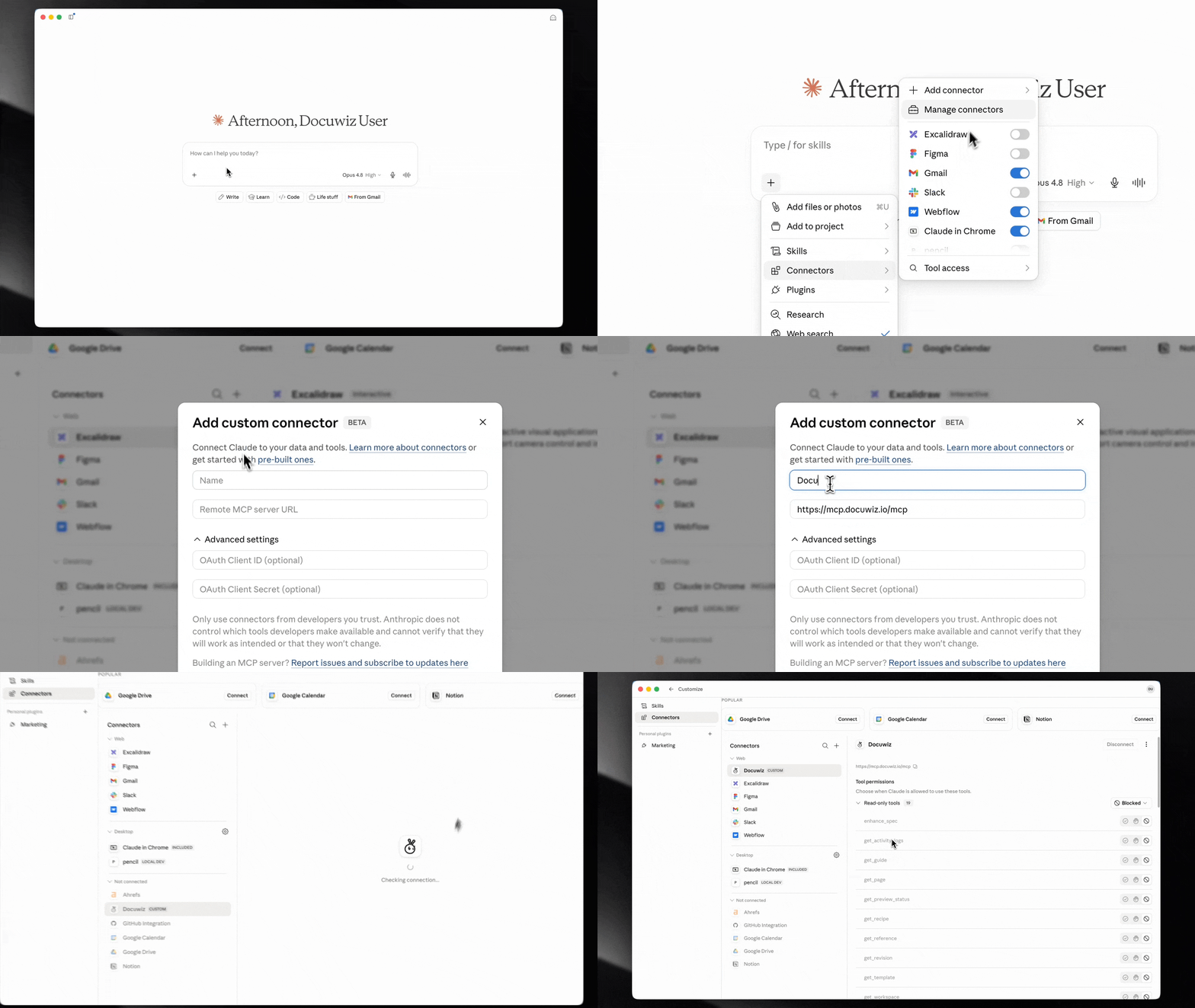
Steps:
Open the Claude desktop app
Click the '+' sign at the bottom of the sidebar
Navigate to Connectors → Add Connectors → Add Custom Connector
Give the connector a name — for example, Docuwiz
Paste the server URL into the URL field:
Save the connector
Once connected, sign in with your Docuwiz credentials. Then use this prompt to confirm everything is working:
Sign me in to Docuwiz and show me my active workspace and all available guides
Sign me in to Docuwiz and show me my active workspace and all available guides
Sign me in to Docuwiz and show me my active workspace and all available guides
Sign me in to Docuwiz and show me my active workspace and all available guides
Sign me in to Docuwiz and show me my active workspace and all available guides
Sign me in to Docuwiz and show me my active workspace and all available guides
Cursor and Windsurf users can connect via a local stdio configuration using npm. The same 44 tools are available in both setups.
Use Case 1: Importing and Managing API Specifications
The situation: Your team ships new API versions regularly, and keeping documentation in sync means constantly uploading spec files, adding revisions, and publishing updates.
Scenario A: Import a new spec for the first time
You have a new service and need to add its OpenAPI spec to Docuwiz for the first time.
Import a new API reference to my Docuwiz workspace. The spec is at
[spec URL] — name it "[API name]"
Import a new API reference to my Docuwiz workspace. The spec is at
[spec URL] — name it "[API name]"
Import a new API reference to my Docuwiz workspace. The spec is at
[spec URL] — name it "[API name]"
Import a new API reference to my Docuwiz workspace. The spec is at
[spec URL] — name it "[API name]"
Import a new API reference to my Docuwiz workspace. The spec is at
[spec URL] — name it "[API name]"
Import a new API reference to my Docuwiz workspace. The spec is at
[spec URL] — name it "[API name]"
What happens: Claude calls import_reference with the URL and name. The spec appears as a new reference. Claude returns the reference ID and initial revision number.
Scenario B: Add a revision when your API changes
A new endpoint just shipped. Add the updated spec as a new revision without losing the previous one.
Add a new revision to the "[API name]" reference. The updated spec is at [updated spec URL]
Add a new revision to the "[API name]" reference. The updated spec is at [updated spec URL]
Add a new revision to the "[API name]" reference. The updated spec is at [updated spec URL]
Add a new revision to the "[API name]" reference. The updated spec is at [updated spec URL]
Add a new revision to the "[API name]" reference. The updated spec is at [updated spec URL]
Add a new revision to the "[API name]" reference. The updated spec is at [updated spec URL]
What happens: Claude calls list_references to find the reference ID, then add_revision with the new spec URL. Returns the new revision number.
Scenario C: Validate before publishing
Validate the latest revision of the "[API name]" reference
and summarize any errors or warnings
Validate the latest revision of the "[API name]" reference
and summarize any errors or warnings
Validate the latest revision of the "[API name]" reference
and summarize any errors or warnings
Validate the latest revision of the "[API name]" reference
and summarize any errors or warnings
Validate the latest revision of the "[API name]" reference
and summarize any errors or warnings
Validate the latest revision of the "[API name]" reference
and summarize any errors or warnings
What happens: Claude retrieves the spec with get_revision, then runs validate_spec locally on your machine. Returns a report of structural errors, warnings, and best-practice suggestions. Your spec never leaves your local model.
Scenario D: Publish a revision
Publish the latest revision of the "[API name]" reference so users can access it
Publish the latest revision of the "[API name]" reference so users can access it
Publish the latest revision of the "[API name]" reference so users can access it
Publish the latest revision of the "[API name]" reference so users can access it
Publish the latest revision of the "[API name]" reference so users can access it
Publish the latest revision of the "[API name]" reference so users can access it
What happens: Claude calls publish_reference with the revision ID. The spec goes live in your workspace documentation.
Use Case 2: Creating and Publishing Documentation Guides
The situation: You launched a new product and need a getting-started guide written, structured, and published before the announcement.
Scenario A: Create a guide with pages in one prompt
Create a new documentation guide in Docuwiz called "[Guide name]".
Add an initial version called "[version]" and create three pages:
"[Page 1]", "[Page 2]", and "[Page 3]"
Create a new documentation guide in Docuwiz called "[Guide name]".
Add an initial version called "[version]" and create three pages:
"[Page 1]", "[Page 2]", and "[Page 3]"
Create a new documentation guide in Docuwiz called "[Guide name]".
Add an initial version called "[version]" and create three pages:
"[Page 1]", "[Page 2]", and "[Page 3]"
Create a new documentation guide in Docuwiz called "[Guide name]".
Add an initial version called "[version]" and create three pages:
"[Page 1]", "[Page 2]", and "[Page 3]"
Create a new documentation guide in Docuwiz called "[Guide name]".
Add an initial version called "[version]" and create three pages:
"[Page 1]", "[Page 2]", and "[Page 3]"
Create a new documentation guide in Docuwiz called "[Guide name]".
Add an initial version called "[version]" and create three pages:
"[Page 1]", "[Page 2]", and "[Page 3]"
What happens: Claude calls create_guide, then create_version, then create_page three times. Returns a summary with the guide ID, version ID, and all three page IDs.
Scenario B: Write content for a specific page
Update the "[Page name]" page in the "[Guide name]" guide with this content:

[Your page content here]
Update the "[Page name]" page in the "[Guide name]" guide with this content:

[Your page content here]
Update the "[Page name]" page in the "[Guide name]" guide with this content:

[Your page content here]
Update the "[Page name]" page in the "[Guide name]" guide with this content:

[Your page content here]
Update the "[Page name]" page in the "[Guide name]" guide with this content:

[Your page content here]
Update the "[Page name]" page in the "[Guide name]" guide with this content:

[Your page content here]
What happens: Claude calls list_guides and get_guide to locate the page ID, then update_page with your content. Returns confirmation with the page and guide name.
Scenario C: Check for existing content before creating
List all guides in my Docuwiz workspace. I want to check if we already have
anything covering [topic] before I create a new guide
List all guides in my Docuwiz workspace. I want to check if we already have
anything covering [topic] before I create a new guide
List all guides in my Docuwiz workspace. I want to check if we already have
anything covering [topic] before I create a new guide
List all guides in my Docuwiz workspace. I want to check if we already have
anything covering [topic] before I create a new guide
List all guides in my Docuwiz workspace. I want to check if we already have
anything covering [topic] before I create a new guide
List all guides in my Docuwiz workspace. I want to check if we already have
anything covering [topic] before I create a new guide
What happens: Claude calls list_guides and returns every guide with version names and publication status. You can check for duplication before creating.
Scenario D: Publish a guide version
Publish version [version] of the "[Guide name]" guide so users can access it
Publish version [version] of the "[Guide name]" guide so users can access it
Publish version [version] of the "[Guide name]" guide so users can access it
Publish version [version] of the "[Guide name]" guide so users can access it
Publish version [version] of the "[Guide name]" guide so users can access it
Publish version [version] of the "[Guide name]" guide so users can access it
What happens: Claude calls get_guide to find the version ID, then publish_guide_version to make it live.
Use Case 3: Organizing Your Documentation Workspace
The situation: You have 20 guides and a dozen API references with no structure. Navigation is hard for your team and your users.
Tools involved: list_categories, create_category, update_category, list_recipes, create_recipe, list_templates, get_template
Scenario A: Set up categories for a product area
Create three categories in Docuwiz: "[Category 1]", "[Category 2]", and "[Category 3]".
Assign the "[API name]" reference to "[Category 1]" and
the "[Guide name]" guide to "[Category 3]"
Create three categories in Docuwiz: "[Category 1]", "[Category 2]", and "[Category 3]".
Assign the "[API name]" reference to "[Category 1]" and
the "[Guide name]" guide to "[Category 3]"
Create three categories in Docuwiz: "[Category 1]", "[Category 2]", and "[Category 3]".
Assign the "[API name]" reference to "[Category 1]" and
the "[Guide name]" guide to "[Category 3]"
Create three categories in Docuwiz: "[Category 1]", "[Category 2]", and "[Category 3]".
Assign the "[API name]" reference to "[Category 1]" and
the "[Guide name]" guide to "[Category 3]"
Create three categories in Docuwiz: "[Category 1]", "[Category 2]", and "[Category 3]".
Assign the "[API name]" reference to "[Category 1]" and
the "[Guide name]" guide to "[Category 3]"
Create three categories in Docuwiz: "[Category 1]", "[Category 2]", and "[Category 3]".
Assign the "[API name]" reference to "[Category 1]" and
the "[Guide name]" guide to "[Category 3]"
What happens: Claude calls create_category three times, then update_category to assign content to each. Returns a summary of the new structure.
Scenario B: Create a recipe for a common workflow
Recipes are structured, task-focused product guides — shorter than full documentation guides and built around a specific user workflow.
Create a recipe in Docuwiz called "[Recipe name]" with these steps:
1. [Step 1]
2. [Step 2]
3. [Step 3]
4. [Step 4]
Create a recipe in Docuwiz called "[Recipe name]" with these steps:
1. [Step 1]
2. [Step 2]
3. [Step 3]
4. [Step 4]
Create a recipe in Docuwiz called "[Recipe name]" with these steps:
1. [Step 1]
2. [Step 2]
3. [Step 3]
4. [Step 4]
Create a recipe in Docuwiz called "[Recipe name]" with these steps:
1. [Step 1]
2. [Step 2]
3. [Step 3]
4. [Step 4]
Create a recipe in Docuwiz called "[Recipe name]" with these steps:
1. [Step 1]
2. [Step 2]
3. [Step 3]
4. [Step 4]
Create a recipe in Docuwiz called "[Recipe name]" with these steps:
1. [Step 1]
2. [Step 2]
3. [Step 3]
4. [Step 4]
What happens: Claude calls create_recipe with the name and steps. Returns the recipe ID. Recipes appear separately from guides and are ideal for task-oriented documentation.
Scenario C: Use a template for consistent page structure
List the available page templates in my Docuwiz workspace, then create a new page
in the "[Guide name]" guide using the "[Template name]" template
List the available page templates in my Docuwiz workspace, then create a new page
in the "[Guide name]" guide using the "[Template name]" template
List the available page templates in my Docuwiz workspace, then create a new page
in the "[Guide name]" guide using the "[Template name]" template
List the available page templates in my Docuwiz workspace, then create a new page
in the "[Guide name]" guide using the "[Template name]" template
List the available page templates in my Docuwiz workspace, then create a new page
in the "[Guide name]" guide using the "[Template name]" template
List the available page templates in my Docuwiz workspace, then create a new page
in the "[Guide name]" guide using the "[Template name]" template
What happens: Claude calls list_templates, then get_template to read the template structure, then create_page using that content as the starting body.
Use Case 4: Validating and Enhancing Specs Locally
The situation: An engineer wrote an OpenAPI spec quickly to hit a deadline. Most endpoints have no descriptions, some schemas are incomplete, and you need to clean it up before publishing.
Tools involved: validate_spec, enhance_spec
Both tools run entirely on Claude's local model. Your spec content is not sent to Docuwiz's servers during these operations.
Scenario A: Validate for structural errors
Validate the spec for the "[API name]" reference in Docuwiz.
Give me errors and warnings grouped by severity
Validate the spec for the "[API name]" reference in Docuwiz.
Give me errors and warnings grouped by severity
Validate the spec for the "[API name]" reference in Docuwiz.
Give me errors and warnings grouped by severity
Validate the spec for the "[API name]" reference in Docuwiz.
Give me errors and warnings grouped by severity
Validate the spec for the "[API name]" reference in Docuwiz.
Give me errors and warnings grouped by severity
Validate the spec for the "[API name]" reference in Docuwiz.
Give me errors and warnings grouped by severity
What happens: Claude retrieves the spec with get_revision, then runs validate_spec locally. Returns a structured report: critical errors, warnings, and informational notes. Nothing leaves your machine.
Scenario B: Enhance with missing descriptions
Enhance the "[API name]" spec to fill in missing endpoint summaries
and parameter descriptions. Do not change any paths, parameters, or response schemas
Enhance the "[API name]" spec to fill in missing endpoint summaries
and parameter descriptions. Do not change any paths, parameters, or response schemas
Enhance the "[API name]" spec to fill in missing endpoint summaries
and parameter descriptions. Do not change any paths, parameters, or response schemas
Enhance the "[API name]" spec to fill in missing endpoint summaries
and parameter descriptions. Do not change any paths, parameters, or response schemas
Enhance the "[API name]" spec to fill in missing endpoint summaries
and parameter descriptions. Do not change any paths, parameters, or response schemas
Enhance the "[API name]" spec to fill in missing endpoint summaries
and parameter descriptions. Do not change any paths, parameters, or response schemas
What happens: Claude runs enhance_spec on the retrieved spec, adds descriptions and summaries where missing, and leaves the API surface untouched. You can then use add_revision to commit the enhanced version.
Use Case 5: Instant API Preview for Any Public Repo
The situation: Your team is evaluating a third-party open-source API before committing to an integration. You want to see the documentation without setting up anything.
Tools involved: preview_repo, get_preview_status
No Docuwiz account required for this feature.
Scenario A: Preview any public API repository
Scan the GitHub repository [repository URL]
for OpenAPI specs and give me a live documentation preview link
Scan the GitHub repository [repository URL]
for OpenAPI specs and give me a live documentation preview link
Scan the GitHub repository [repository URL]
for OpenAPI specs and give me a live documentation preview link
Scan the GitHub repository [repository URL]
for OpenAPI specs and give me a live documentation preview link
Scan the GitHub repository [repository URL]
for OpenAPI specs and give me a live documentation preview link
Scan the GitHub repository [repository URL]
for OpenAPI specs and give me a live documentation preview link
What happens: Claude calls preview_repo with the repository URL. The server scans it for OpenAPI spec files, generates live documentation, and returns a shareable preview URL. No login, no import, no configuration.
Scenario B: Retrieve the preview URL later in your session
What was the preview URL from the last repo I scanned
What was the preview URL from the last repo I scanned
What was the preview URL from the last repo I scanned
What was the preview URL from the last repo I scanned
What was the preview URL from the last repo I scanned
What was the preview URL from the last repo I scanned
What happens: Claude calls get_preview_status and returns the most recent preview URL from your current session.
Use Case 6: Search Across Your Entire Documentation
The situation: You are onboarding a new engineer and want to find everything in your workspace related to a specific topic — across guides, specs, and recipes — in one place.
Tool involved: search
Search my Docuwiz workspace for everything related to "[topic]".
Include guides, API reference endpoints, and recipes
Search my Docuwiz workspace for everything related to "[topic]".
Include guides, API reference endpoints, and recipes
Search my Docuwiz workspace for everything related to "[topic]".
Include guides, API reference endpoints, and recipes
Search my Docuwiz workspace for everything related to "[topic]".
Include guides, API reference endpoints, and recipes
Search my Docuwiz workspace for everything related to "[topic]".
Include guides, API reference endpoints, and recipes
Search my Docuwiz workspace for everything related to "[topic]".
Include guides, API reference endpoints, and recipes
What happens: Claude calls search with the query. Returns results grouped by type: guide pages, API endpoints, recipes, and references. Also useful before creating new content to check whether something similar already exists.
Full Workflow: From Zero to Published Docs in 5 Prompts
Prompt 1 — Audit what exists
List all guides and API references in my Docuwiz workspace
List all guides and API references in my Docuwiz workspace
List all guides and API references in my Docuwiz workspace
List all guides and API references in my Docuwiz workspace
List all guides and API references in my Docuwiz workspace
List all guides and API references in my Docuwiz workspace
Prompt 2 — Import and validate the spec
Import the OpenAPI spec from [spec URL]
as a new reference called "[API name]".
Then validate it and summarize any issues
Import the OpenAPI spec from [spec URL]
as a new reference called "[API name]".
Then validate it and summarize any issues
Import the OpenAPI spec from [spec URL]
as a new reference called "[API name]".
Then validate it and summarize any issues
Import the OpenAPI spec from [spec URL]
as a new reference called "[API name]".
Then validate it and summarize any issues
Import the OpenAPI spec from [spec URL]
as a new reference called "[API name]".
Then validate it and summarize any issues
Import the OpenAPI spec from [spec URL]
as a new reference called "[API name]".
Then validate it and summarize any issues
Prompt 3 — Enhance the spec
Enhance the "[API name]" spec to fill in missing descriptions,
then save the enhanced version as a new revision
Enhance the "[API name]" spec to fill in missing descriptions,
then save the enhanced version as a new revision
Enhance the "[API name]" spec to fill in missing descriptions,
then save the enhanced version as a new revision
Enhance the "[API name]" spec to fill in missing descriptions,
then save the enhanced version as a new revision
Enhance the "[API name]" spec to fill in missing descriptions,
then save the enhanced version as a new revision
Enhance the "[API name]" spec to fill in missing descriptions,
then save the enhanced version as a new revision
Prompt 4 — Create the guide structure
Create a new guide called "[Guide name]" with a [version] version
and these pages: [Page 1], [Page 2], [Page 3], and [Page 4]
Create a new guide called "[Guide name]" with a [version] version
and these pages: [Page 1], [Page 2], [Page 3], and [Page 4]
Create a new guide called "[Guide name]" with a [version] version
and these pages: [Page 1], [Page 2], [Page 3], and [Page 4]
Create a new guide called "[Guide name]" with a [version] version
and these pages: [Page 1], [Page 2], [Page 3], and [Page 4]
Create a new guide called "[Guide name]" with a [version] version
and these pages: [Page 1], [Page 2], [Page 3], and [Page 4]
Create a new guide called "[Guide name]" with a [version] version
and these pages: [Page 1], [Page 2], [Page 3], and [Page 4]
Prompt 5 — Organize and publish
Create a category called "[Category name]" and assign both the "[API name]"
reference and "[Guide name]" guide to it.
Then publish the latest revision of the reference and version [version] of the guide
Create a category called "[Category name]" and assign both the "[API name]"
reference and "[Guide name]" guide to it.
Then publish the latest revision of the reference and version [version] of the guide
Create a category called "[Category name]" and assign both the "[API name]"
reference and "[Guide name]" guide to it.
Then publish the latest revision of the reference and version [version] of the guide
Create a category called "[Category name]" and assign both the "[API name]"
reference and "[Guide name]" guide to it.
Then publish the latest revision of the reference and version [version] of the guide
Create a category called "[Category name]" and assign both the "[API name]"
reference and "[Guide name]" guide to it.
Then publish the latest revision of the reference and version [version] of the guide
Create a category called "[Category name]" and assign both the "[API name]"
reference and "[Guide name]" guide to it.
Then publish the latest revision of the reference and version [version] of the guide
Five prompts. A complete documentation launch. No UI required.
Frequently Asked Questions
What is Docuwiz MCP?
Docuwiz MCP is a Model Context Protocol server that gives Claude, Cursor, and Windsurf access to your Docuwiz documentation workspace through 44 tools. You manage API specs, guides, categories, templates, and more through natural conversation.
How do I connect Docuwiz MCP to Claude?
Open the Claude desktop app, click '+' in the sidebar, go to Connectors → Add Connectors → Add Custom Connector, give it a name, and paste https://mcp.docuwiz.io/mcp as the server URL. The connection activates immediately.
Does spec validation send my API data to Docuwiz's servers?
No. The validate_spec and enhance_spec tools run entirely on your local model. Your spec content is processed inside Claude and is not transmitted to Docuwiz's servers.
Can I use Docuwiz MCP without a Docuwiz account?
The preview_repo feature works without an account — it scans any public GitHub or GitLab repo and generates a live API documentation preview. Full workspace management requires a Docuwiz account.
Which AI assistants does Docuwiz MCP support?
Claude (via the Claude desktop app), Cursor, and Windsurf. Remote connection via the server URL and local stdio setup via npm are both supported.
What is the difference between a recipe and a guide?
A guide is a multi-page, versioned documentation space for comprehensive reference content. A recipe is a shorter, task-focused guide built around a specific workflow — such as "Set up webhooks" or "Add a team member." Both are manageable through Docuwiz MCP.
What types of content can I manage through Docuwiz MCP?
OpenAPI and Swagger API specifications, multi-version documentation guides, individual pages, categories, recipes, and page templates.
How does the identity and permissions model work?
You sign in once when connecting. After that, every tool call acts as your identity within your assigned role and workspace. Sessions exist in memory only and are not persisted by the server.