Docuwiz vs GitBook: Best GitBook Alternative for API Docs
Compare Docuwiz vs GitBook for API documentation teams. See OpenAPI workflows, Git sync, AI, self-hosting, migration, and best-fit use cases.

Team Docuwiz
Documentation Experts

Sign Up for Docuwiz
Experience the magic of collaborative documentation with Docs-As-Code Workflow
Docuwiz vs GitBook: A GitBook Alternative for API Documentation Teams
If your team is evaluating GitBook alternatives for API documentation, the real question is: “Do we need a general documentation platform, or do we need an API-first documentation workflow?”
That distinction matters. GitBook is still an active, widely used documentation platform. It remains a strong choice for product managers, support teams, customer success, marketing, operations, and internal knowledge teams that need a familiar workspace for product docs, onboarding guides, help centers, internal documentation, and AI-assisted maintenance of product docs.
Docuwiz is a better fit when API documentation is owned across developers, technical writers, QA, product teams, DevRel, and platform teams. It is designed for documentation tied to OpenAPI specs, validation, linting, API references, playgrounds, versioning, Git sync, review workflows, access control, and deployment controls.
This guide compares Docuwiz vs. GitBook for teams that are already considering GitBook, already using it, or searching for GitBook alternatives because their docs have become API-heavy enough to require a more specialized API documentation workflow.
What is the quick verdict on Docuwiz vs GitBook?
Choose Docuwiz if your primary need is API documentation depth: OpenAPI-based references, spec upload, Git sync, OAS validation, linting, API playgrounds, versioning, collaboration between developers and writers, role-based access control, branded API portals, or on-premises deployment.
Choose GitBook if your primary need is a general collaborative documentation workspace for product documentation, help centers, internal knowledge bases, broad team wikis, launch notes, onboarding content, AI-assisted doc maintenance, or a familiar block editor for mixed technical and non-technical contributors.
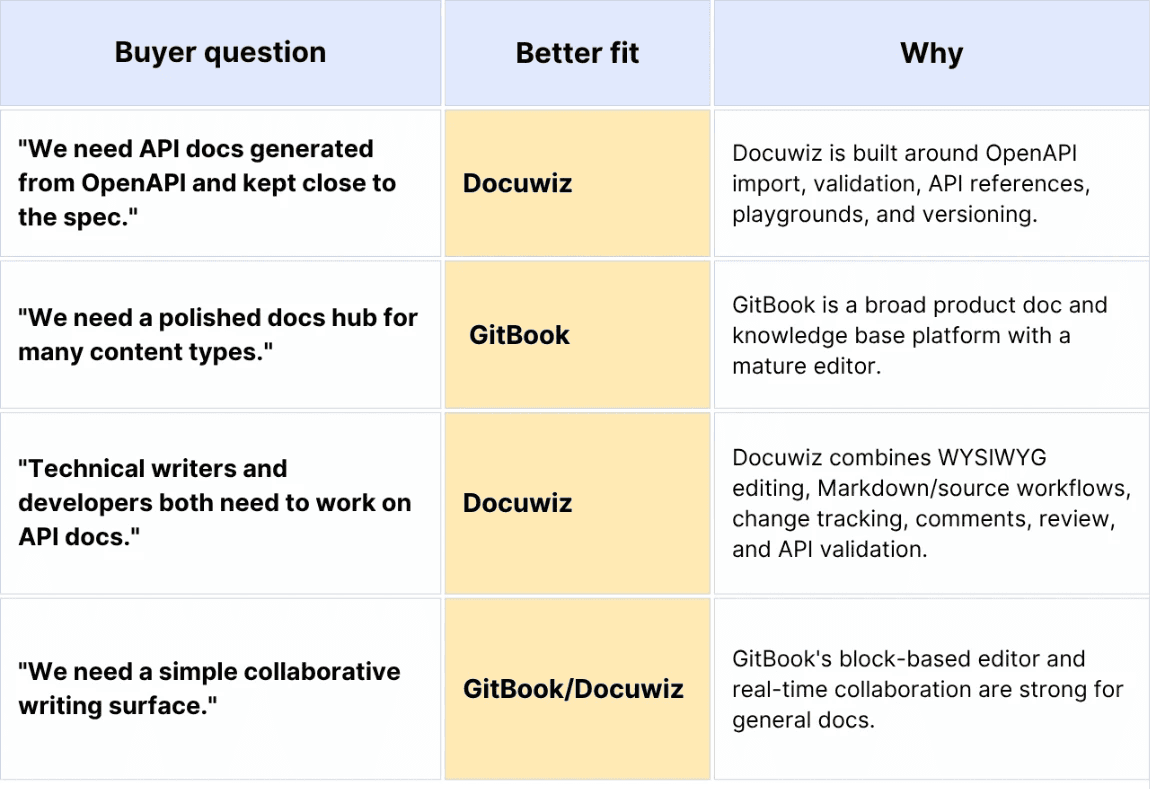
The 2-minute fit comparison:
Why do teams search for GitBook alternatives?
Teams search for GitBook alternatives when the documentation problem changes from "we need a place to write and publish docs" to "we need documentation that behaves like part of the API delivery process."
The most common drivers are pricing shape, API documentation depth, Git-based version control, CI/CD needs, self-hosting requirements, and migration from general docs into API-first docs.
Pricing and scaling concerns
GitBook's current public pricing uses a per-site-plus-per-user model for paid plans. As of May 2026, GitBook lists Premium at $65 per site/month plus $12 per user/month, and Ultimate at $249 per site/month plus $12 per user/month.
That pricing model can be perfectly reasonable for a single public docs site with a small contributor group. It becomes more noticeable when a company has multiple products, multiple doc sites, and a larger group of contributors.
For example:

The issue is not just the number. It is predictability. A buyer evaluating GitBook alternatives wants to know whether the bill scales by site, user, AI usage, private access, enterprise controls, or all of the above.
Need for specialized API documentation workflows
GitBook supports OpenAPI documentation and interactive API blocks. Its documentation says teams can import OpenAPI files, link to hosted specs, use the GitBook CLI, generate API reference pages, and let users test endpoints through blocks powered by Scalar. Its current API documentation page also positions GitBook as a complete API documentation platform with OpenAPI or Swagger import, auto-updating API docs, Git Sync, and an API playground.
That is useful. For many teams, it is enough.
The question is whether API documentation is a feature inside your docs platform or the operating center of your docs workflow. API-first teams often need more than an embedded reference block:
OpenAPI Specification import and validation
Linting and quality checks
Generated API references
Playground behavior tied to the source spec
Versioned API docs
Git sync and branching
Change tracking and diff views
Review workflows across engineering, QA, product, and technical writing
Access controls for private, partner, and public docs
Branded publishing for developer experience
Docuwiz is built around that API documentation workflow rather than adding API blocks to a general docs workspace.
OpenAPI, Git-based version control, and CI/CD requirements
Hacker News and developer forum discussions about GitBook alternatives often cite the same evaluation checklist: OpenAPI or Swagger support, robust Markdown support, interactive API docs, Git-based version control, CI/CD deployment, and syntax-highlighted code samples.
That checklist is not random. It is how API teams keep docs from drifting.
If a team ships API changes through GitHub, GitLab, Bitbucket, CI checks, release branches, and versioned specs, documentation has to participate in that system. A manual publishing step in a separate docs tool leads to stale examples, broken parameters, and mismatched response objects.
GitBook can integrate with Git and CI/CD for OpenAPI blocks. Docuwiz approaches the problem from the API docs side: sync specs directly from GitHub, GitLab, or Bitbucket; import OpenAPI, Markdown, or cURL snippets; auto-version and branch docs alongside the codebase; and work in an inline OAS editor with a rendered view.
Self-hosting and data-residency requirements
Reddit threads in r/selfhosted show that some teams are looking for GitBook alternatives because they want more control over where their documentation is hosted.
Some teams cannot upload API specs to a third-party SaaS documentation platform. That is common in banking, healthcare, government, enterprise software, cybersecurity, telecom, and regulated B2B SaaS.
For those teams, "Does it have a nice editor?" is not the first question. The first question is: "Can we deploy it in a way that security will approve?"
Docuwiz publicly lists on-premises deployment as part of its Enterprise plan. That makes it a credible GitBook alternative for teams that need API documentation plus deployment control.
If the requirement is fully open-source self-hosting rather than enterprise on-premises software, that is a different buyer: open-source tools are best when a team is comfortable owning hosting, search, theme customization, auth, redirects, analytics, and API reference integration.
Migration from general docs to API-first docs
Many teams start their documentation journey with GitBook because it is easy to write in. That is a good reason.
The migration question appears later, when the docs become more API-shaped:
Endpoint references are spread across manually written pages
Parameters documented in prose instead of being generated from OpenAPI
Authentication examples copied into multiple places
Screenshots and code samples drift from the product
Version history exists, but not in the same rhythm as API releases
Technical writers depend on developers to confirm every endpoint detail
At that point, moving from GitBook to an API-first platform like Docuwiz is not just a CMS migration. It is a workflow migration from pages to specs, validation, review, and versioned publishing.
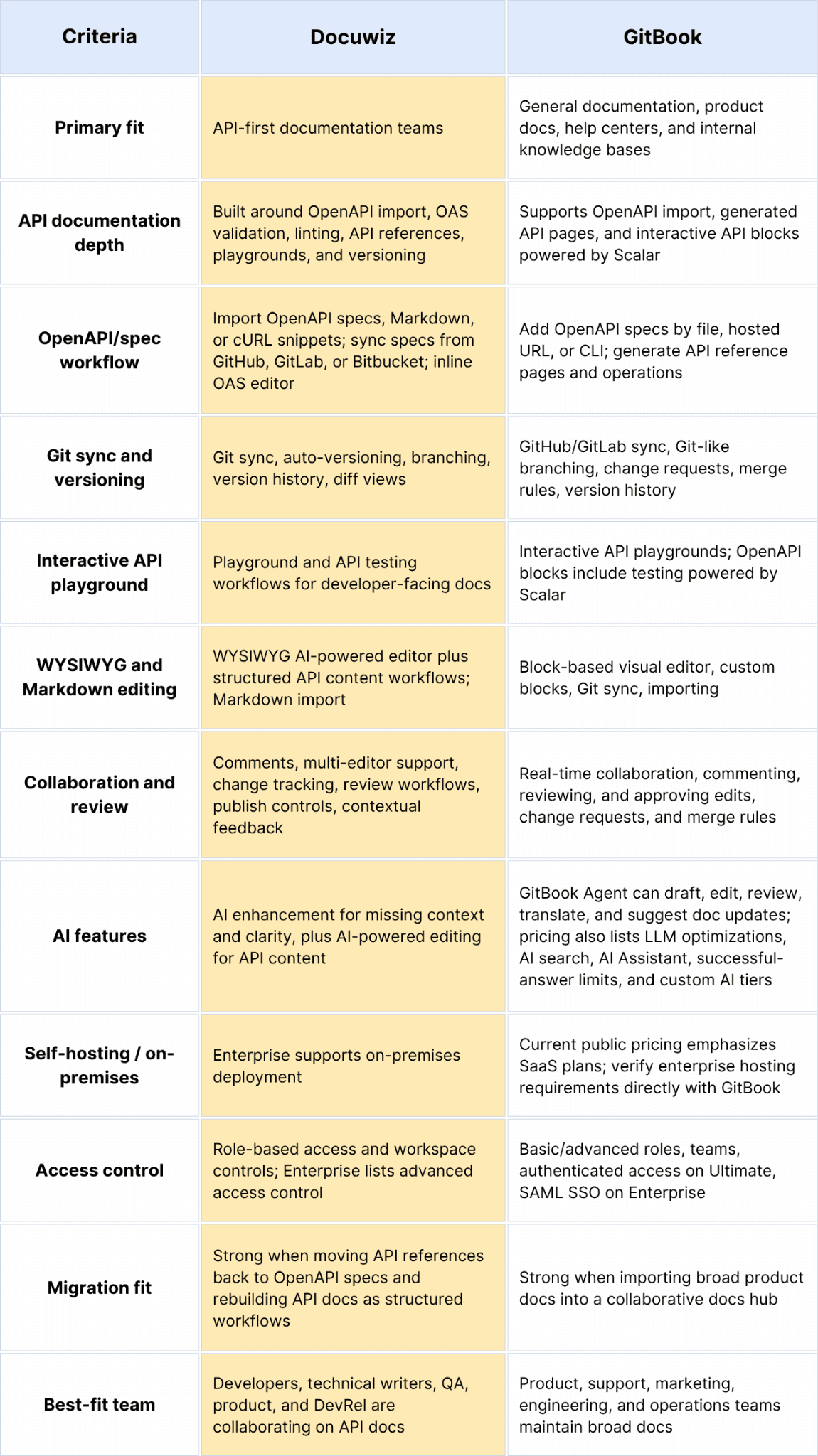
How do Docuwiz and GitBook compare?
Docuwiz is an API documentation platform for teams that treat API docs as part of the API lifecycle. GitBook is a broader documentation platform for teams that need collaborative product docs, internal knowledge, and published documentation sites.
How does GitBook handle API documentation?
GitBook handles API documentation by combining OpenAPI-powered blocks, generated API reference pages, Git Sync, auto-updating specs, and API playgrounds inside a broader documentation platform.
That gives GitBook a useful middle ground. A team can write conceptual guides, onboarding pages, tutorials, and product documentation in the same workspace where it embeds API references.
GitBook's OpenAPI documentation and API docs product page say teams can:
Add OpenAPI specs by file upload
Load OpenAPI specs from a hosted URL
Use the GitBook CLI
Generate pages from OpenAPI tags
Insert complete API references into the table of contents
Add individual OpenAPI operations or schemas to pages
Keep endpoint pages updated when the spec is updated
Let users test API methods with interactive blocks powered by Scalar
Build branded API docs that sit alongside product docs, help content, internal knowledge, and other documentation types
That is a strong feature set for teams whose docs combine API references with product documentation, help content, internal knowledge, and support workflows.
The limitation is structural. GitBook is not only an API documentation tool. It is a documentation platform that supports API docs. That makes it flexible, but it also means API-specific workflows may sit alongside general docs workflows rather than defining the whole system.
How does Docuwiz handle API documentation?
Docuwiz handles API documentation as a source-of-truth workflow: import the spec, validate it, improve the human-readable context, collaborate across teams, version the docs, and publish a branded API portal.
Docuwiz positions itself as live API docs, straight from your specs. The workflow is designed for the real team behind API documentation: developers, technical writers, QA, product teams, and DevRel.
For developers, Docuwiz lists:
GitHub, GitLab, and Bitbucket spec sync
OpenAPI, Markdown, and cURL import
Auto-versioning and branching alongside the codebase
Inline OAS editor with a rendered view
For technical writers, Docuwiz lists:
WYSIWYG AI-powered editor for API content
API validation
"Enhance with AI" for missing context and clarity
Pre-built templates and smart sectioning
Real-time preview
Change tracking
Publish controls
For product teams, Docuwiz lists:
API validations for missing or inconsistent parameters
Diff views for spec and guide updates
Violation tracking with correction comparisons
Version history and audit-ready logs
Role-based access and workspace controls
Custom themes, layouts, domains, and branding
Consumer-ready pages for guides, references, and quick links
That makes Docuwiz a stronger fit when API documentation is shared work. Developers own the spec. Writers own clarity. QA owns consistency. Product and DevRel own developer experience. A good API docs platform has to let each group contribute without forcing everyone to use the same tool.
What does the API documentation workflow look like in practice?
The practical difference between Docuwiz and GitBook shows up when a team changes an API.
In a general docs workflow, someone updates a page. In an API-first workflow, the source spec changes, the docs need to reflect that change, the examples need to stay correct, and the published reference needs to remain testable.
A GitBook-style API docs workflow
A GitBook-based workflow can look like this:
Developers update the OpenAPI spec in a repository or hosted location.
GitBook syncs content from GitHub or GitLab, or the team updates the OpenAPI spec through file, URL, or CLI.
GitBook generates or updates API reference pages and OpenAPI blocks.
Writers add guide content, tutorials, and product context in the block editor.
Reviewers use GitBook's collaboration, comments, change requests, version history, and GitBook Agent for AI-assisted review or suggested edits.
The team publishes the docs site.
This works well when the API reference is a single content type within a larger documentation site, especially if the team also wants AI-assisted maintenance across support, product, and internal knowledge workflows.
A Docuwiz-style API docs workflow
A Docuwiz-based workflow can look like this:
Developers sync specs from GitHub, GitLab, or Bitbucket, or import OpenAPI, Markdown, or cURL snippets.
Docuwiz validates the API documentation and flags missing or inconsistent parameters.
Writers use WYSIWYG and structured templates to add explanations, onboarding flows, and context that's missing.
QA reviews diffs, violations, correction comparisons, and version history.
Product or DevRel reviews the branded portal, quick links, references, and guides.
The team publishes versioned API documentation with access control and workspace governance.
This works well when the API reference is not just embedded content. It is the center of the documentation system.
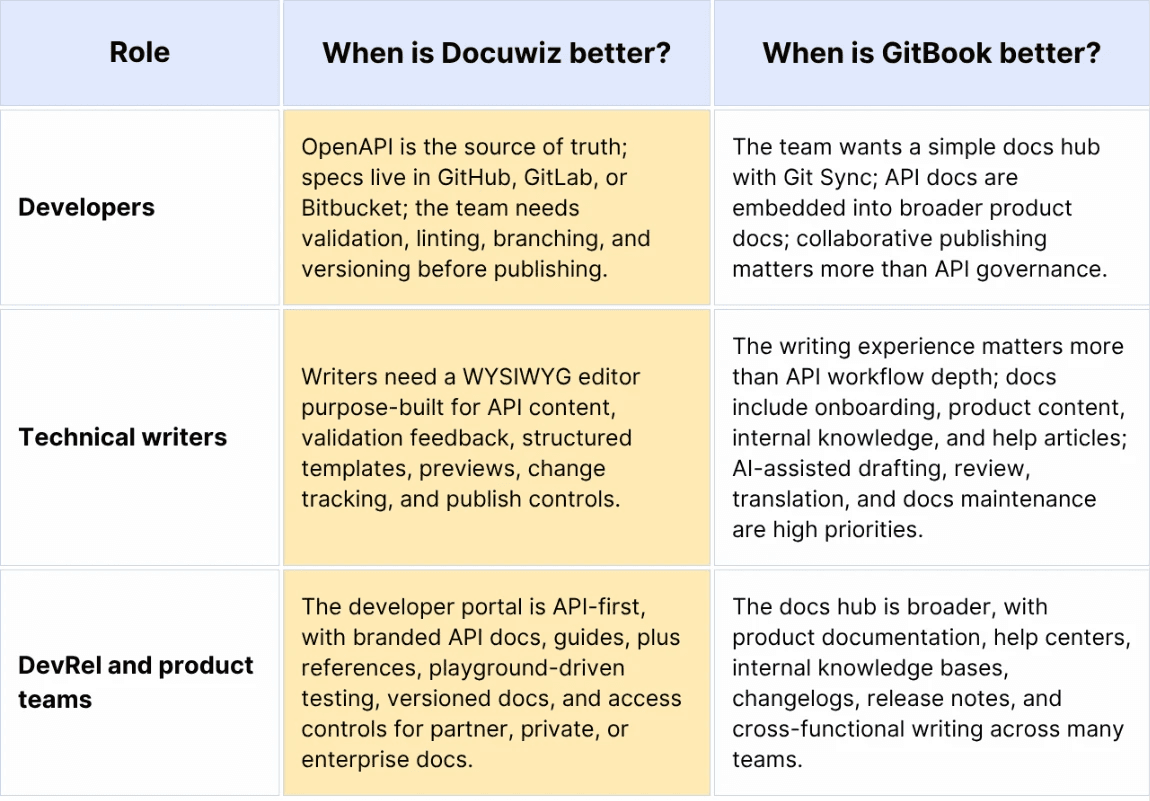
Which is better for developers, technical writers, and DevRel?
Docuwiz is usually better when developers, technical writers, QA, product managers, and DevRel all share responsibility for API documentation. GitBook is usually better when many teams need a shared workspace for writing and publishing broader documentation.
How do collaboration and publishing compare?
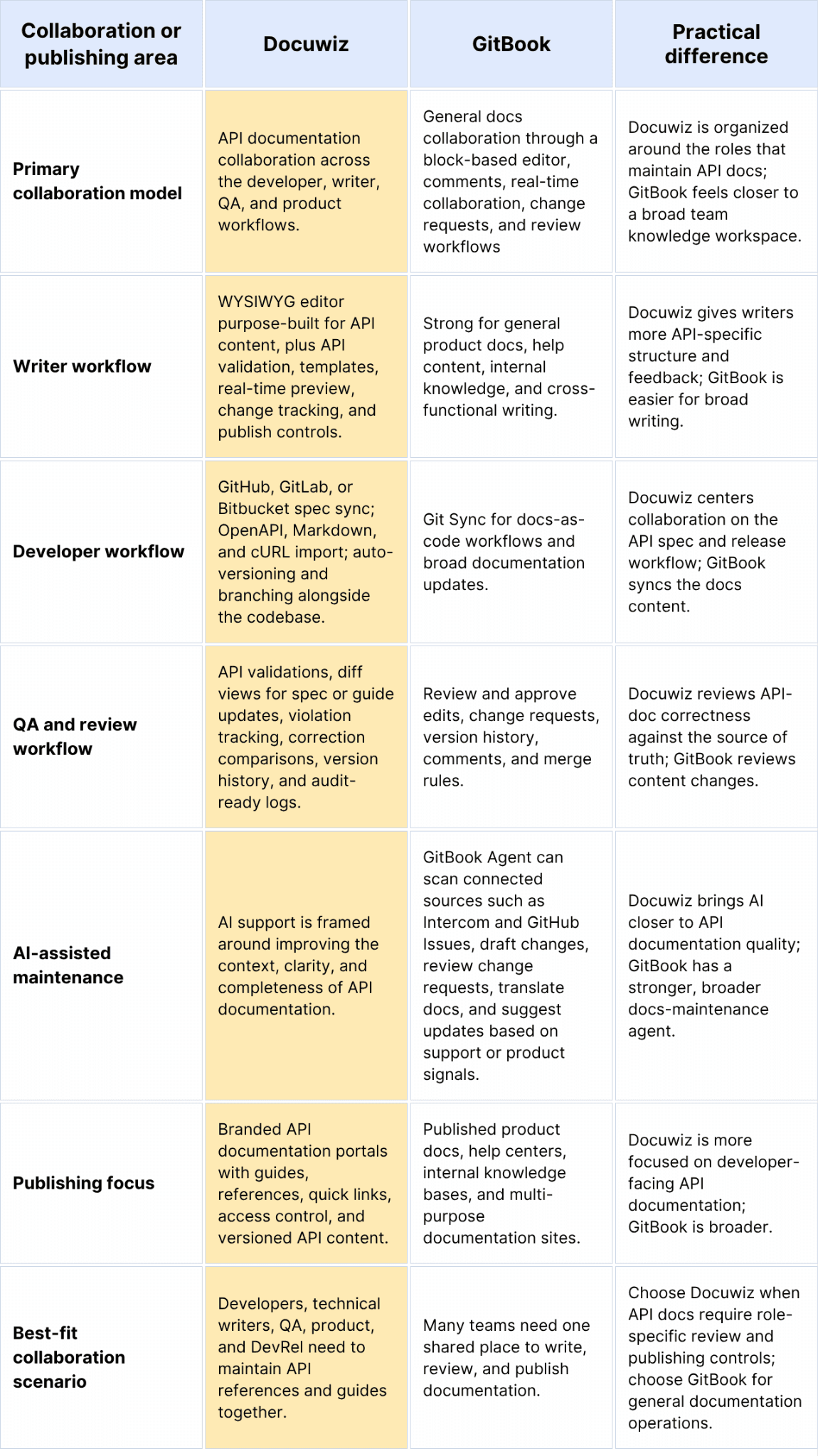
Docuwiz's collaboration model is better for API-specific review across developers, writers, QA, product, and DevRel. GitBook's collaboration model is better for broad, familiar documentation editing, especially now that GitBook Agent can participate in drafting, reviewing, translating, and suggesting doc changes.
How do you migrate from GitBook to Docuwiz?
Migrating from GitBook to Docuwiz moves API documentation closer to its source of truth, rather than recreating every GitBook page exactly. Use the migration to separate general docs from API references, rebuild what belongs in OpenAPI, and clean up the developer journey.
Audit the existing GitBook space. List the spaces, sections, public pages, private pages, API references, guides, images, embeds, internal links, redirects, and high-traffic pages. Tag each page as API reference, API guide, product/general documentation, or internal wiki content so you know what moves into Docuwiz and what belongs somewhere else.
Identify API-specific content to rebuild rather than copy. Manually written endpoint pages, request examples, response examples, authentication instructions, SDK setup pages, and error-code pages often drift over time. If a page describes API behavior, check whether it belongs in or ties back to the OpenAPI spec, rather than migrating it as static prose.
Convert reusable guide content into a portable format. Move conceptual guides, onboarding pages, and tutorials into Markdown or another import-friendly format where possible. While converting, check headings, tables, code fences, callouts, images, internal links, and front matter so the content does not carry broken GitBook-specific formatting into the new portal.
Clean up and import the OpenAPI specs. Before importing specs into Docuwiz, validate syntax, confirm the OpenAPI version, add missing descriptions, review schemas, clarify authentication, and check request/response examples. Then use Docuwiz to import the spec, run validation, generate references, and identify missing or inconsistent API details.
Map the new API-first information architecture. Do not copy the GitBook navigation automatically if it grew organically over time. A cleaner Docuwiz portal typically includes an overview, quickstart, authentication, core concepts, API reference, guides, SDKs, errors, rate limits, changelog, and versioned docs.
QA the migrated developer journey before launch. Test redirects, internal links, images, code samples, generated references, playground behavior, authentication examples, versioned content, private/public access, and search. For a small docs site, migration may take a long weekend; for a multi-product API program with private docs, multiple versions, custom blocks, SDK pages, and redirects, plan for several weeks.
Is Docuwiz a good GitBook alternative for API documentation?
Yes. Docuwiz is a strong GitBook alternative for API documentation teams when the docs need to stay close to OpenAPI specs, release workflows, QA review, and developer-facing publishing.
The fit is strongest when API docs are part of the product lifecycle rather than a set of static support pages. GitBook may still be better when the team mainly needs a broad documentation workspace for many departments and content types.
Final recommendation: Docuwiz or GitBook?
GitBook is a strong general documentation platform. It remains a credible choice for teams that want one collaborative workspace for product docs, internal docs, help centers, and broad documentation hubs.
Docuwiz is the stronger GitBook alternative when API documentation needs to behave like part of the API delivery process, not just another content collection.
The cleanest decision rule is this:
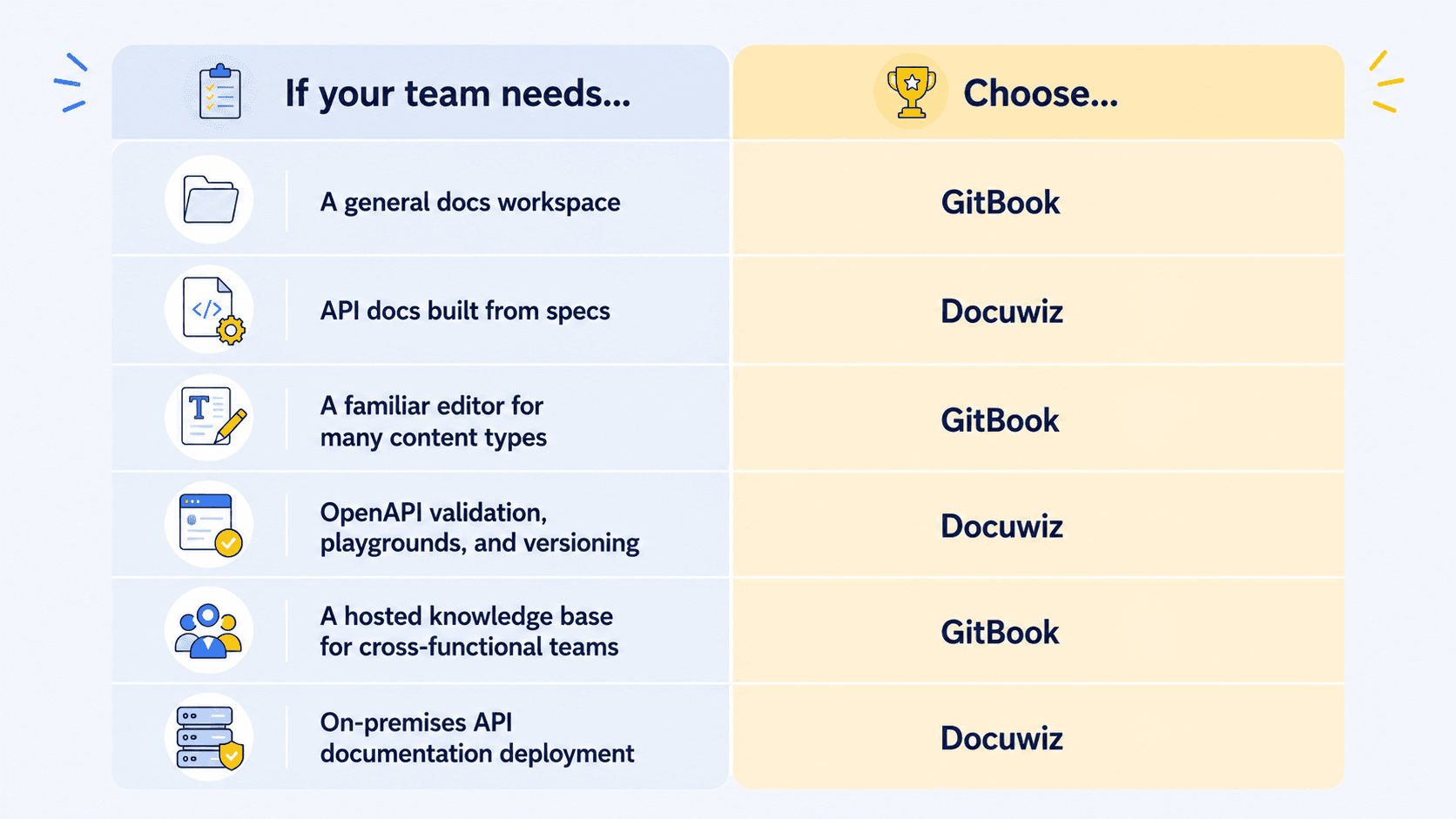
For API documentation teams, the question is not whether GitBook is good. It is whether GitBook is specific enough for the way your API team works. If the answer is no, Docuwiz is the more focused alternative.
FAQs
Is GitBook worth it?
GitBook is worth it when your team needs a collaborative workspace for product docs, internal knowledge, onboarding content, and external docs sites. Its block editor, Git sync, GitBook Agent, AI search, AI Assistant, and hosted publishing model are useful for broad documentation teams. The main caution is pricing shape: paid plans scale by site and user, and advanced AI features are plan-dependent.
Is Docuwiz a good GitBook alternative for API documentation?
Yes. Docuwiz is a good GitBook alternative for API documentation because it is built for teams that manage specs, references, guides, reviews, publishing, and deployment controls together. It is especially relevant when developers, technical writers, QA, product, and DevRel all contribute to API documentation.
What is the difference between Docuwiz and GitBook?
The main difference is product focus. Docuwiz is built around API documentation workflows, while GitBook is a broader documentation platform.
Which is better for API documentation: Docuwiz or GitBook?
Docuwiz is usually better when the API reference, guides, review process, and publishing workflow need to move together. GitBook can be better when API docs are one part of a larger documentation hub.
How do I migrate documentation from GitBook to Docuwiz?
Start by auditing the GitBook space, separating API references from guides and general docs. Convert prose content to Markdown or a portable format where possible, rebuild API references from OpenAPI specs, map a new API-first information architecture, and QA links, images, redirects, playground behavior, examples, and versioned content before launch. The goal is not to clone GitBook page-for-page, but to move API documentation closer to the source spec.
Are there modern alternatives to GitBook?
Yes. Modern GitBook alternatives include Docuwiz, Mintlify, ReadMe, Fern, Stoplight, Redocly, Docusaurus, MkDocs, Docsify, BookStack, Wiki.js, Docmost, Outline, Archbee, Docsie, Document360, Doctave, Featurebase, and HelpDocs. The best option depends on whether the team needs API-first documentation, a general knowledge base, open-source self-hosting, docs-as-code, or a startup-friendly hosted docs platform.
Sources checked
Written by
Team Docuwiz
Documentation Experts
The Docuwiz team helps developer-focused companies build documentation their users actually love — from API references to onboarding guides and everything in between.