Best API Documentation Tools in 2026: Comparison Guide
Compare the best API documentation tools in 2026 by authoring workflow, Git sync, AI pricing, self-hosting, collaboration, and team fit.

Team Docuwiz
Documentation Experts
Sign Up for Docuwiz
Experience the magic of collaborative documentation with Docs-As-Code Workflow
The Best API Documentation Tools in 2026
For years, API documentation tools were judged by a fairly basic standard: could they turn an API spec into a readable reference, organize supporting guides, and publish everything in a usable developer portal?
That is no longer enough. In 2026, the buying question is broader. Teams need documentation that stays close to the API, gives developers a fast way to test endpoints, lets technical writers improve content without waiting on engineers, supports branded publishing, and avoids surprise bills from seats, sites, or AI usage.
This guide compares the API documentation tools that matter most to teams in 2026: Docuwiz, Swagger UI/SwaggerHub, Redocly, and Bump.sh, Scalar, ReadMe, Stoplight, GitBook, Mintlify, Theneo, Fern, and Docusaurus.
The goal is not to crown one universal winner. The goal is to help you understand which tool matches your team, workflow, deployment needs, and budget.
What Is an API Documentation Tool?
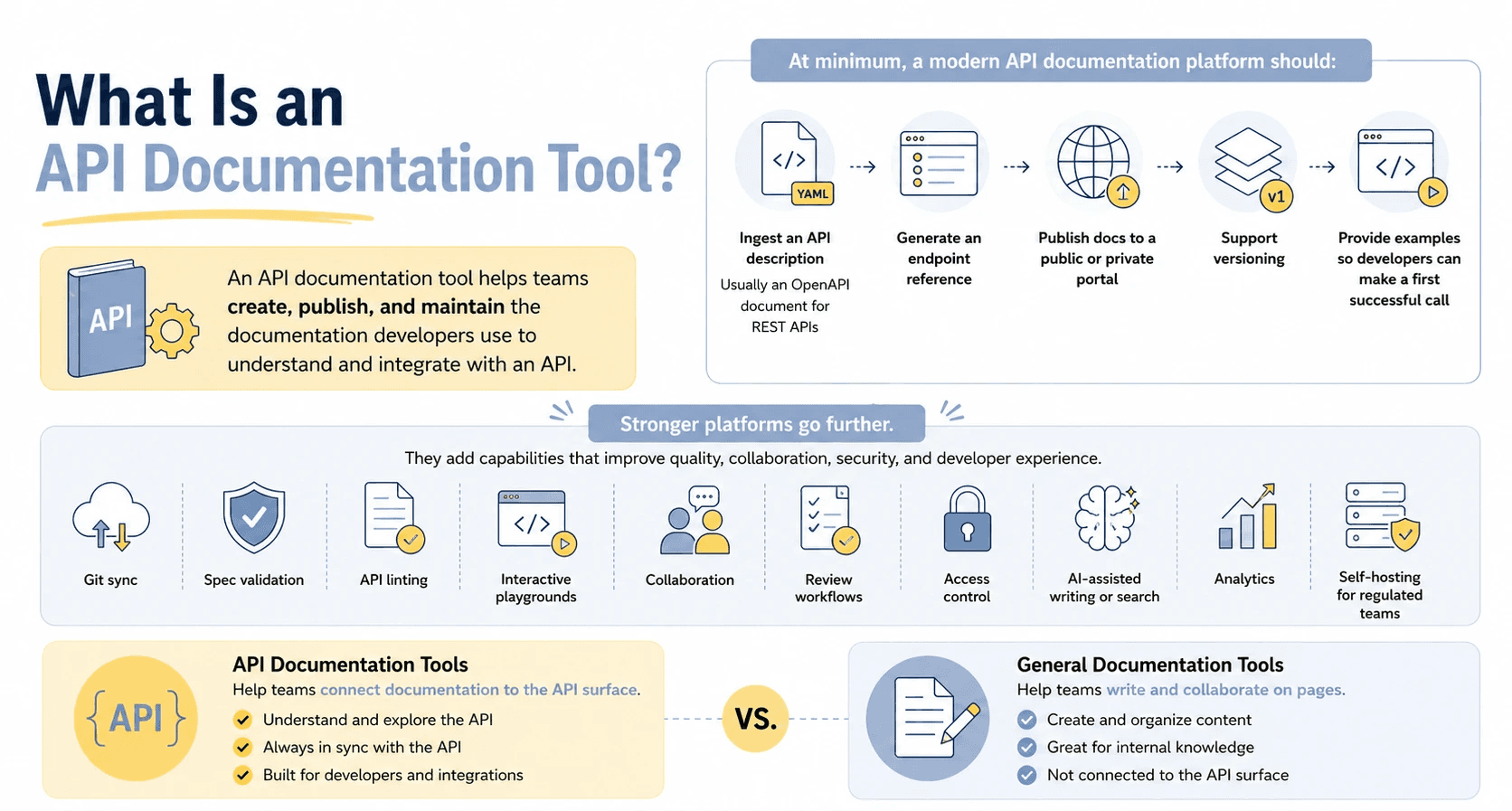
An API documentation tool helps teams create, publish, and maintain the documentation developers use to understand and integrate with an API.
At minimum, a modern API documentation platform needs to ingest an API description, usually an OpenAPI document for REST APIs, generate an endpoint reference, publish docs to a public or private portal, support versioning, and give readers enough examples to make a first successful call.
Stronger platforms go further. They add Git sync, spec validation, API linting, interactive playgrounds, collaboration, review workflows, access control, AI-assisted writing or search, analytics, and self-hosting for regulated teams.
That makes API documentation tools different from general documentation tools like Notion or Confluence. General docs tools help teams write and collaborate on pages. But API documentation tools help teams connect those pages to the API surface itself.
How To Evaluate API Documentation Tools in 2026
Most comparison pages still sort tools by surface features. That misses the risks buyers discover only after rollout.
Use these seven criteria before shortlisting tools.
1. Spec Format Support
OpenAPI support is the baseline for REST API documentation. Some teams also need support for AsyncAPI, GraphQL, gRPC, SOAP, or Arazzo. If your API estate spans more than just REST, format support must be verified early.
Format claims also need plan-level checking. A vendor may support a format, but only on enterprise or through a separate product.
2. Authoring Workflow and Persona Fit
Authoring workflow decides who can own and maintain the docs.
A docs-as-code workflow works well for engineering teams that want documentation changes reviewed, versioned, and shipped through Git. Visual and Markdown editors work better when writers, DevRel, PMs, or support teams need to contribute without owning the full Git workflow. Hybrid authoring models matter when both groups need to work in the same system.
If writers cannot edit the docs, documentation quality becomes dependent on engineering availability.
3. Git Sync and CI/CD Workflow
Git sync matters because API docs decay when product changes and document publishing live in siloes.
Developer-first teams need a way to sync specs from GitHub, validate OpenAPI files, preview changes, and fold docs checks into CI/CD. Even writer-friendly platforms need a credible Git workflow if engineering owns the API definition.
4. Interactivity
Static endpoint pages are no longer the bar for API docs. Readers expect a try-it console, generated code samples, sample responses, authentication guidance, and clear error examples.
An API playground shortens the distance between reading and testing. It also exposes missing details faster than a passive reference page.
5. AI Pricing Model
AI is now part of documentation workflows: drafting endpoint descriptions, improving examples, answering reader questions, checking document quality, and preparing content for AI agents.
The pricing model matters as much as the feature. Some vendors include AI, some meter it with credits or answer limits, and some use BYOK, where the customer brings their own model-provider key.
If a team expects AI to run across a large docs site, credit-based pricing can become a finance problem, not just a product feature.
6. Self-Hosting and Deployment Control
Many teams can use SaaS without issue. Others cannot upload API specs to a third-party platform due to security, data residency, banking, healthcare, government, or procurement regulations.
Self-hosting is a hard requirement for that segment. If it matters, verify whether the vendor offers true self-hosting, single-tenant hosting, private cloud, or only SaaS.
7. Total Cost at Team Size
The listed monthly price rarely tells the full story.
Calculate your likely cost at 10 seats, multiple docs sites, AI usage, custom domains, SSO, private docs, and enterprise support. Mintlify lists a Pro plan at $250/month with 5 dashboard members and additional members at $20/month, plus AI credits with overages on its pricing page. GitBook lists Premium at $65 per site/month plus $12 per user/month and Ultimate at $249 per site/month plus $12 per user/month on its pricing page.
Those models may be perfectly reasonable for some teams. They just need to be modeled before a migration.
API Documentation Tools Comparison Table
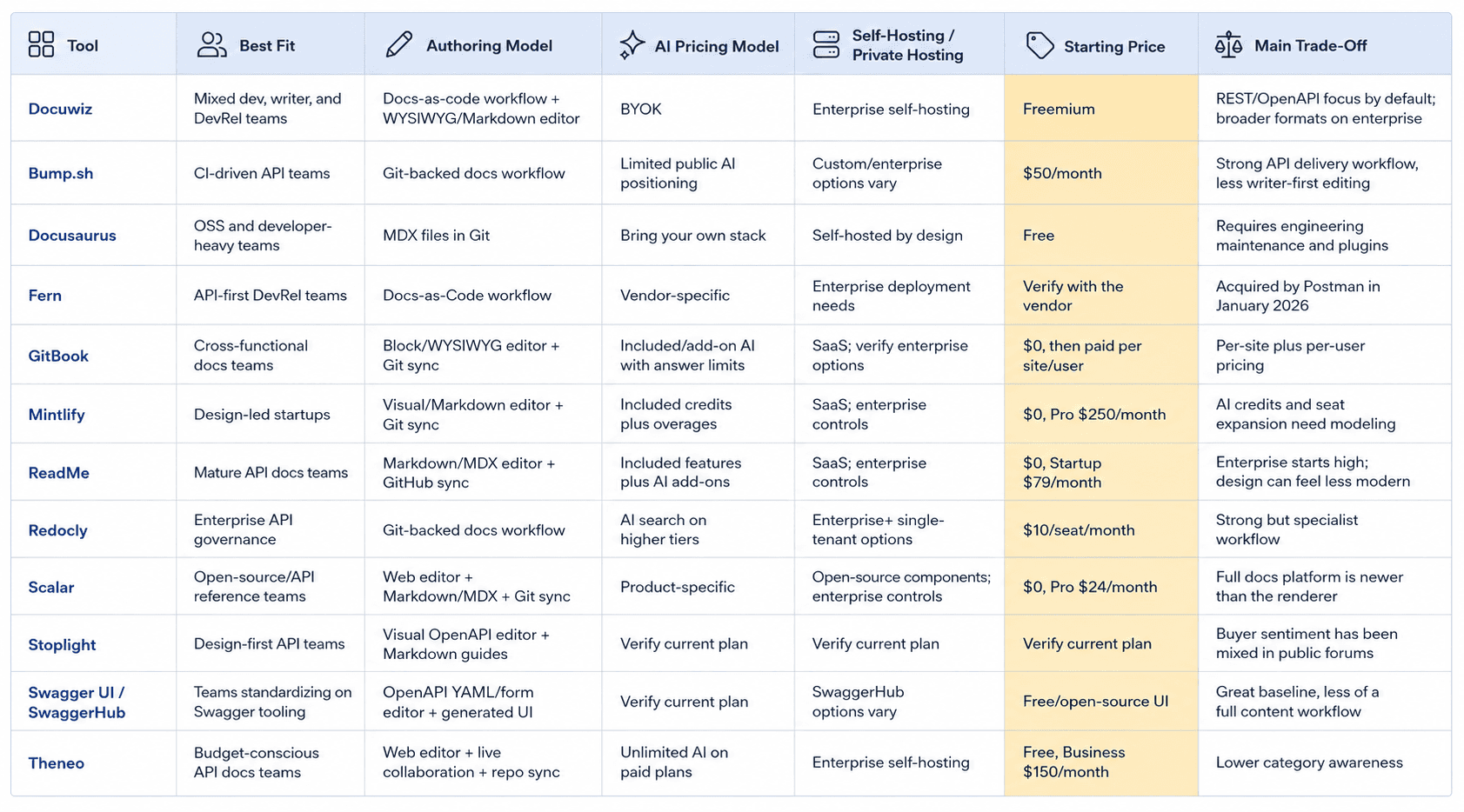
Tool Profiles
Docuwiz
Docuwiz is built for teams where developers, technical writers, and DevRel leads all contribute to API documentation.
Docuwiz does not replace the docs-as-code idea; it makes the same docs-as-code workflow accessible to more people, including non-developers. Developers can bring in API definitions through Git sync or spec upload, validate and lint OpenAPI specs, manage versions, and give readers an API playground. Writers can use WYSIWYG or Markdown instead of depending on engineering for every page update. DevRel and platform teams get collaboration workflows, commenting, access control, and a branded publishing portal.
The clearest Docuwiz fit is a cross-functional team that wants developer-grade API docs without making the entire docs process developer-only.
Docuwiz also has two practical differentiators for buyers who have been burned by other tools. Its AI model is BYOK, so teams connect their own OpenAI or Anthropic key rather than buying platform-marked-up AI credits. And self-hosting is available on the enterprise plan for teams that cannot use SaaS-hosted documentation.
Product qualifier:
Docuwiz is built for teams where developers, technical writers, QA, product managers, and DevRel leads all contribute to API documentation. Docuwiz is positioned as a way to keep a docs-as-code approach while giving non-developers a WYSIWYG/Markdown path into the same workflow, with collaboration, review controls, and publishing workflows.
Developers can sync specs from GitHub, GitLab, or Bitbucket; import OpenAPI, Markdown, or cURL snippets; auto-version and branch docs alongside the codebase; and work in an inline OAS editor with a rendered view.
For writers, the site highlights a WYSIWYG, AI-powered editor; API validation; AI enhancements for missing context and clarity; templates; real-time preview; change tracking; and publish controls. For QA and product teams, it emphasizes validation, diff views, violation tracking, version history, RBAC, workspace controls, custom themes, custom domains, and branded consumer-ready pages.
The clearest Docuwiz fit is a mixed team that wants developer-grade API docs without making the entire docs process developer-only. It is especially relevant for teams trying to consolidate API references, guides, linting, Git sync, AI enhancements, versioning, collaboration, RBAC, custom branding, and publishing into a single workflow.
Pricing is simple, straightforward, and is designed for teams of all sizes and requirements.
The Free plan is for individuals documenting a single API and includes REST API docs, API Guides, up to 5 members, OAS validation, limited AI credits, one workspace, starter customization, a sub-domain, and starter templates.
The Pro plan is for growing teams and lists 25 members, linting and validation, monthly AI credits, multi-workspace support, a custom landing page, a custom domain, and reusable templates.
The Enterprise plan for large orgs managing secure API ecosystems. It offers all the features of the Pro plan, plus adds support for GraphQL, gRPC, AsyncAPI, and SOAP formats, API Workflow Docs, API Testing, API Design Studio, API Monetization, Access Key Approval, Integrated Forum, On-Prem Deployment, and Advanced Access Control.
Bump.sh
Bump.sh is for teams that want API documentation closely tied to delivery. Its pricing page lists Basic at $50/month for 10 docs and 3 users, and Pro at $250/month for 30 docs and 5 users. The tool's strengths are OpenAPI and AsyncAPI support, CLI and GitHub integration, documentation hubs, API Explorer on Pro, automatic changelog, branches, CI integration, and rollback.
The buyer fit is clear: engineering teams that want docs to move with API changes. The trade-off is that Bump.sh is less focused on a writer-owned WYSIWYG workflow than products built for cross-functional documentation teams.
Docusaurus
Docusaurus is a free, open-source static site generator backed by Meta. It is a strong fit for open-source projects and developer-heavy teams that want full control over their docs site, React components, MDX content, and hosting.
The cost is not the license. The cost is maintenance.
Teams that use Docusaurus for API docs often need plugins or custom work for OpenAPI rendering, search, auth, private docs, analytics, playgrounds, AI features, and non-developer editing. That can still be the right choice for a developer-led team with strong frontend capacity. It becomes painful when writers, DevRel, support, and product teams need to publish changes without working through Git.
Fern
Fern has been a strong fit for API-first companies that want documentation and SDK generation from an OpenAPI source. Postman announced on January 8, 2026, that it had acquired Fern, describing Fern as a developer experience company focused on polished API documentation and production-ready SDKs.
That does not make Fern a bad choice. It does mean buyers need to ask current roadmap and packaging questions directly. If your team is already using Fern, evaluate what changes, if any, Postman's ownership creates for pricing, support, roadmap, and platform fit.
GitBook
GitBook is strong for collaborative product documentation. Its Block/WYSIWYG editor + Git sync is approachable, the interface feels familiar to non-developers, and the product has added API playgrounds, Git sync, LLM optimizations, MCP server support, and AI capabilities.
The buying concern is the pricing shape. GitBook lists paid plans per site plus per user: Premium at $65 per site/month plus $12 per user/month, and Ultimate at $249 per site/month plus $12 per user/month. A team with multiple public doc sites and many contributors needs to calculate the real monthly cost before migration.
GitBook works well when the main need is collaborative docs across many content types. API-first teams need to inspect how deep the native API documentation workflow goes compared with tools built around OpenAPI from the start.
Mintlify
Mintlify is the design leader in the category. It is popular with startups because it quickly makes modern docs look polished. Its current pricing page lists a free Hobby plan and Pro at $250/month, including 5 dashboard members, with additional members at $20/month. It also lists API playground, Git sync, web editor, MCP server, agent features, and 5,000 included credits with overages.
Mintlify is a strong fit for design-led API-first startups and teams that want AI-native docs with a modern front end.
The trade-off is cost predictability. Seat expansion and AI overages need to be modeled. Teams that prefer BYOK AI, self-hosting, or a writer-first workflow may shortlist other tools alongside Mintlify.
ReadMe
ReadMe is one of the most mature API documentation platforms. Its pricing page lists a limited Free plan, a pro plan at $300/month, and the Enterprise plan at $3,000+/month when billed annually. ReadMe includes API versions, an interactive API reference, a Markdown editor, customizable themes, LLMs.txt, and an MCP server on the Free plan, with Ask AI available as an add-on at $150/month for all plans.
ReadMe fits teams that want a proven API docs platform with reader analytics and mature collaboration patterns.
The trade-off is positioning and cost at scale. Some teams find the output less visually modern than Mintlify's. Also, the Ask AI add-on can add significant cost overage to the already expensive monthly plan, and the enterprise pricing starts at a different tier of $3000+/month than self-serve startup tools.
Redocly
Redocly is strongest for platform and governance teams. Its pricing page lists Pro at $10 per seat/month, Enterprise at $24 per seat/month, and Enterprise+ as custom. It also lists support for OpenAPI, GraphQL, AsyncAPI, SOAP, mock servers, linting, catalog, scorecards, MCP servers, data residency, and single-tenant hosting options.
Redocly is the right shortlist candidate when API standards, governance, linting, and complex API programs matter more than a visual writer workflow.
The trade-off is accessibility for non-developers. Redocly is a strong docs-as-code product, but that can become a barrier when technical writers or DevRel teams need to own content without engineering mediation.
Scalar
Scalar is best known for its open-source API reference and developer-friendly design. Its pricing page lists Free, Pro at $72/month, and Enterprise custom pricing. Scalar is compelling when teams want an attractive OpenAPI reference, low lock-in, and tooling that developers can adopt quickly. Scalar is especially strong for teams that want to start with the reference layer. It is also appealing for teams that care about low lock-in, since its reference tooling has strong open-source roots.
The trade-off is maturity at the broader documentation-workflow layer. Scalar is excellent as an API reference renderer, but buyers should test the full platform carefully if they need writer workflows, review processes, multi-persona collaboration, advanced access control, branded publishing, analytics, and large-scale content governance. For teams that want a great reference layer first, Scalar belongs high on the shortlist. For teams trying to run the entire API documentation lifecycle across developers, writers, QA, and DevRel, it may need to be paired with other processes or compared with more comprehensive platforms.
Stoplight
Stoplight has long appealed to teams that want visual API design and documentation workflows. It belongs in the shortlist when design-first API planning matters as much as final docs publishing.
Because public buyer sentiment in developer forums has been mixed, treat Stoplight as a product to evaluate hands-on rather than as a default pick. Import a real spec, test the editor, publish a reference, and ask the team that will maintain the docs whether the workflow feels better than their current setup.
Swagger UI and SwaggerHub
Swagger UI is still the baseline for rendering OpenAPI documentation. It is familiar, open-source, and widely understood by developers. SwaggerHub adds a broader platform around API design and documentation.
The strength is standardization. If your team already lives in Swagger tooling, this path can reduce adoption friction.
The trade-off is that Swagger UI alone is not a full content workflow. It renders a reference, but teams still need to solve guides, tutorials, collaboration, review, publishing, analytics, access control, AI, and design polish.
Theneo
Theneo is one of the closest product peers to Docuwiz. Its pricing page lists a free Starter package, Business at $150/month on monthly billing, Growth at $450/month, and an Enterprise custom. It also lists REST, Async, SOAP, GraphQL, and gRPC formats; an API playground; versioning; an automatic changelog; AI search; a web editor; live collaboration; GitHub sync; and enterprise self-hosting.
Theneo deserves attention from teams that want broad format support, collaboration, and AI-heavy documentation features.
The main weakness is not the feature set. It is awareness. Compared with Mintlify, ReadMe, Redocly, and GitBook, Theneo has less category gravity and fewer familiar proof points for cautious buyers.
Decision Framework: Which API Documentation Tool Is Best?
There is no single best API documentation tool. So, here’s the shortlist for choosing the right platform based on your operating model.
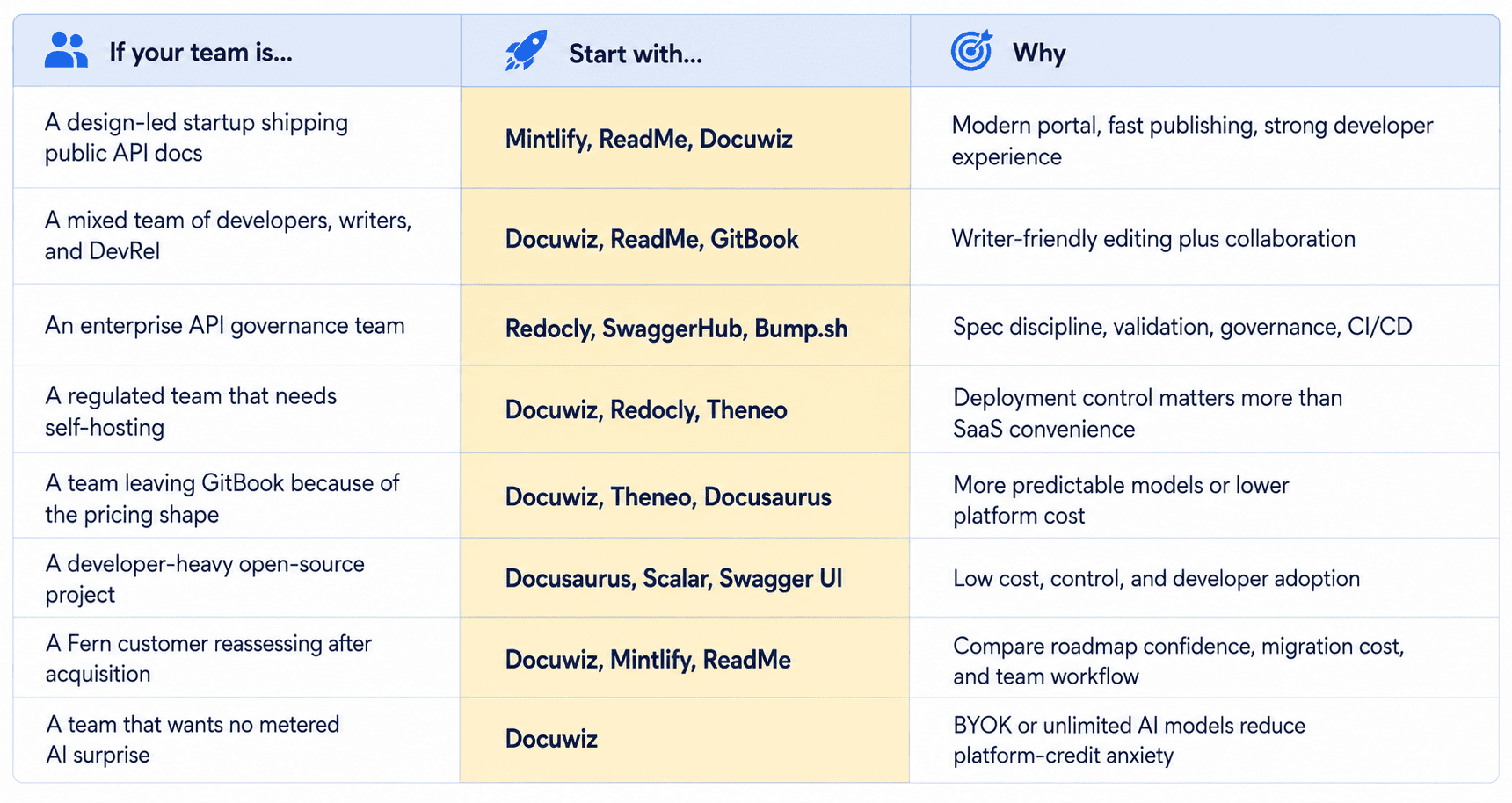
The Best Way To Document an API
Tool choice matters, but workflow matters more. A strong API docs process usually follows five steps.
1. Start With a Spec
Use OpenAPI for REST APIs whenever possible. A spec gives the docs a structured source of truth: endpoints, methods, parameters, request bodies, responses, auth, and errors.
2. Validate Before Publishing
Run OpenAPI validation and linting before changes reach the public docs. Broken specs become broken docs, and broken docs become support tickets.
3. Choose an Editing Model That Matches the Team
If engineers own all the docs, a docs-as-code workflow can work. If writers, DevRel, or product teams contribute, choose a platform with visual editing, review, and collaboration.
4. Add Guides Around the Reference
A generated reference explains what exists. Guides explain how to succeed. Pair endpoint pages with quickstarts, auth guides, code examples, SDK notes, error handling, pagination, and webhooks.
5. Measure and Improve
Look at searches, failed searches, page exits, support tickets, playground failures, and reader feedback. API docs are a product surface, not a one-time publishing task.
How Docuwiz Fits This Workflow
Docuwiz fits teams that want API documentation to work as a shared product surface, not a developer-only publishing task. Its features map across the full documentation workflow: importing specs, validating them, improving content, collaborating across teams, publishing a branded portal, and managing access as the API program grows.
GitHub, GitLab, and Bitbucket sync: Keeps documentation closer to the codebase, so API changes and docs updates do not drift into separate workflows.
OpenAPI, Markdown, and cURL import: Let teams bring in existing API material instead of rebuilding documentation from scratch.
Inline OAS editor with rendered view: Helps developers and API owners edit the source spec while seeing how the docs will appear to readers.
OAS validation and linting: Catches structural issues before they reach the published docs, reducing broken references and reader confusion.
Auto-versioning and branching: Makes it easier to maintain docs across API versions, releases, and work-in-progress changes.
WYSIWYG AI-powered editor: Gives technical writers and non-developer contributors a practical way to improve docs without living in Git.
AI enhancement for missing context and clarity: Helps teams turn thin endpoint references into more useful explanations, examples, and guidance.
Real-time preview and publish controls: Gives editors more confidence before shipping changes to public or private docs.
Change tracking, diff views, and version history: Makes documentation review easier for QA, product, and engineering teams.
RBAC and workspace controls: Let larger teams manage who can view, edit, review, and publish documentation.
Custom themes, custom domains, and branded pages: Turns API docs into a polished developer portal that feels like part of the product, not a disconnected reference site.
Enterprise on-premises deployment: Gives security-sensitive teams a deployment path when SaaS-hosted documentation is not acceptable.
The main value is that Docuwiz brings the developer and writer workflows into a single system. Developers can keep API docs tied to specs, validation, and code-adjacent changes. Writers and product teams can improve clarity, structure, and publishing quality without waiting on engineering for every edit. DevRel and platform teams can turn the result into a branded developer experience with built-in access control, versioning, and collaboration.
2026 Trends To Watch
Three shifts are changing API documentation buying decisions.
Docs are becoming agent-readable. LLMs.txt, MCP servers, structured examples, and consistent endpoint pages help AI coding tools answer developer questions more reliably.
AI pricing is becoming a buying criterion. Teams now ask not only "Does it have AI?" but also "What happens when the whole docs site uses it every day?"
Category consolidation has started. Postman's acquisition of Fern signals that API documentation, SDK generation, testing, collaboration, and developer experience are converging.
The best tool choice in 2026 is the one that keeps your docs useful for humans, structured for machines, and maintainable by the actual team responsible for them.
FAQs
What is an API documentation tool?
An API documentation tool helps teams create, publish, and maintain docs for developers who integrate with an API. Modern tools usually include API spec ingestion, endpoint references generation, versioning, publishing, collaboration, and interactive testing.
Which API documentation tool is best?
Docuwiz is best for mixed teams where developers, technical writers, QA, product managers, and DevRel all need to collaborate on API documentation within a single workflow. It combines spec sync, validation, AI-assisted editing, versioning, branded publishing, and access control. Other tools fit different needs: Mintlify for design-led startups, ReadMe for mature API docs teams, Redocly for governance-heavy enterprises, Scalar and Swagger UI for open-source reference needs, and Docusaurus for developer-owned custom docs sites.
What is the best way to document an API?
Start with an OpenAPI spec, validate it before publishing, choose an editing workflow your team can maintain, add guides and examples around the generated reference, and measure where readers struggle.
What is the best free API documentation tool?
Swagger UI, Docusaurus, Scalar's free tier, GitBook's free tier, ReadMe's free tier, and Docuwiz's free plan can all be good starting points. The best free option depends on whether you need an open-source renderer, a custom docs site, or a hosted platform.
Which API documentation tools support self-hosting?
Docuwiz offers self-hosting on the enterprise plan. Theneo lists self-hosting on Enterprise. Redocly lists single-tenant hosting options on Enterprise+. Docusaurus is self-hosted by design because it is an open-source static site generator. Always verify the exact deployment model with the vendor.
How does AI pricing work in API documentation tools?
AI pricing varies by vendor. Some tools include limited AI usage, some meter usage with credits or successful answers, some sell AI add-ons, and Docuwiz uses BYOK, so teams bring their own OpenAI or Anthropic key.
What happened to Fern?
Postman announced its acquisition of Fern on January 8, 2026. Fern's product remains relevant, but current and prospective customers need to ask about the roadmap, packaging, migration, and support in light of the acquisition.
What is the best GitBook alternative for API documentation?
For API-heavy teams, compare Docuwiz, ReadMe, Mintlify, Redocly, Scalar, Theneo, and Fern. If GitBook's pricing model is the main issue, pay special attention to each alternative's seat, site, AI, and enterprise pricing before migration.
Written by
Team Docuwiz
Documentation Experts
The Docuwiz team helps developer-focused companies build documentation their users actually love — from API references to onboarding guides and everything in between.