8 API Documentation Examples in 2026 and What to Borrow
Study eight standout API documentation examples from Stripe, Twilio, GitHub, Slack, Google Maps, Shopify, Plaid, and OpenAI.

Team Docuwiz
Documentation Experts

Sign Up for Docuwiz
Experience the magic of collaborative documentation with Docs-As-Code Workflow
8 Best API Documentation Examples in 2026 and What Makes Them Great
Great API documentation examples are more useful as a pattern library than as a trophy case.
Most teams already know the familiar names: Stripe, Twilio, GitHub, Slack, Google Maps, Shopify, Plaid, and OpenAI. The harder question is why those docs work. Is it the layout? The code samples? The quickstarts? The interactive console? How are authentication and errors explained?
This guide breaks down eight strong API documentation examples and turns them into practical patterns your team can reuse. The goal is not to copy Stripe's exact interface or rebuild Google's documentation system. The goal is to identify the pieces that reduce developer uncertainty: what to call, how to authenticate, what parameters matter, what response to expect, what can fail, and where to go next.
What Makes an API Documentation Example Worth Studying?
Good API docs help a developer make the first correct request and the tenth correct integration decision.
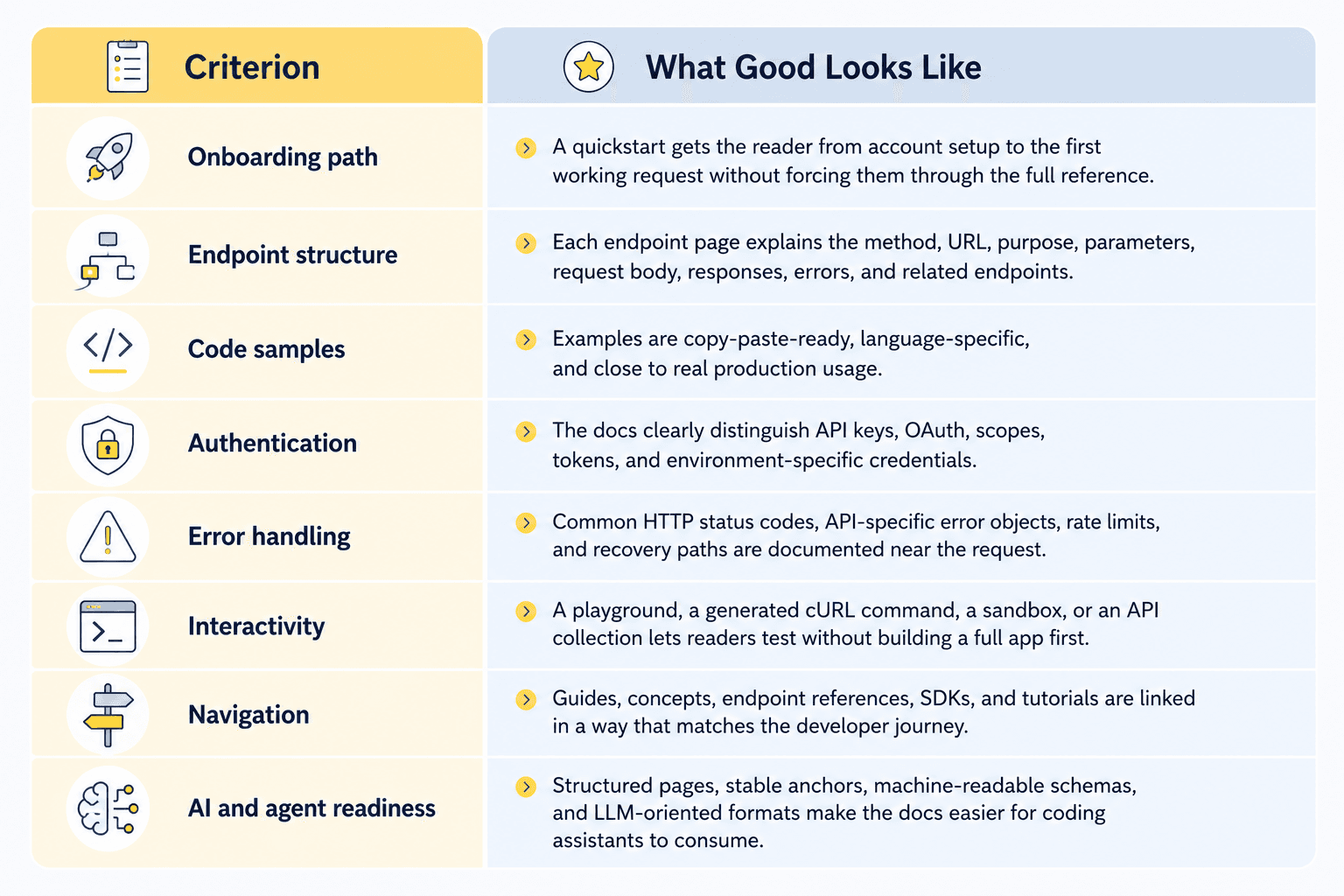
Use these criteria when evaluating any API documentation example:
8 Best API Documentation Examples
1. Stripe API Reference: Best for Side-by-Side Endpoint Usability
Stripe's API Reference is the default example people bring up when they talk about great API documentation. That reputation is not only about the familiar three-column layout. Stripe works because it keeps the reader's attention on the exact relationship between the explanation and the executable code.
The reference establishes the basics early: Stripe describes the API as REST-oriented, using predictable resource URLs, form-encoded request bodies, JSON responses, standard HTTP response codes, authentication, and HTTP verbs in the API reference introduction. That framing matters because it gives developers a mental model before they reach individual endpoints.
What stands out
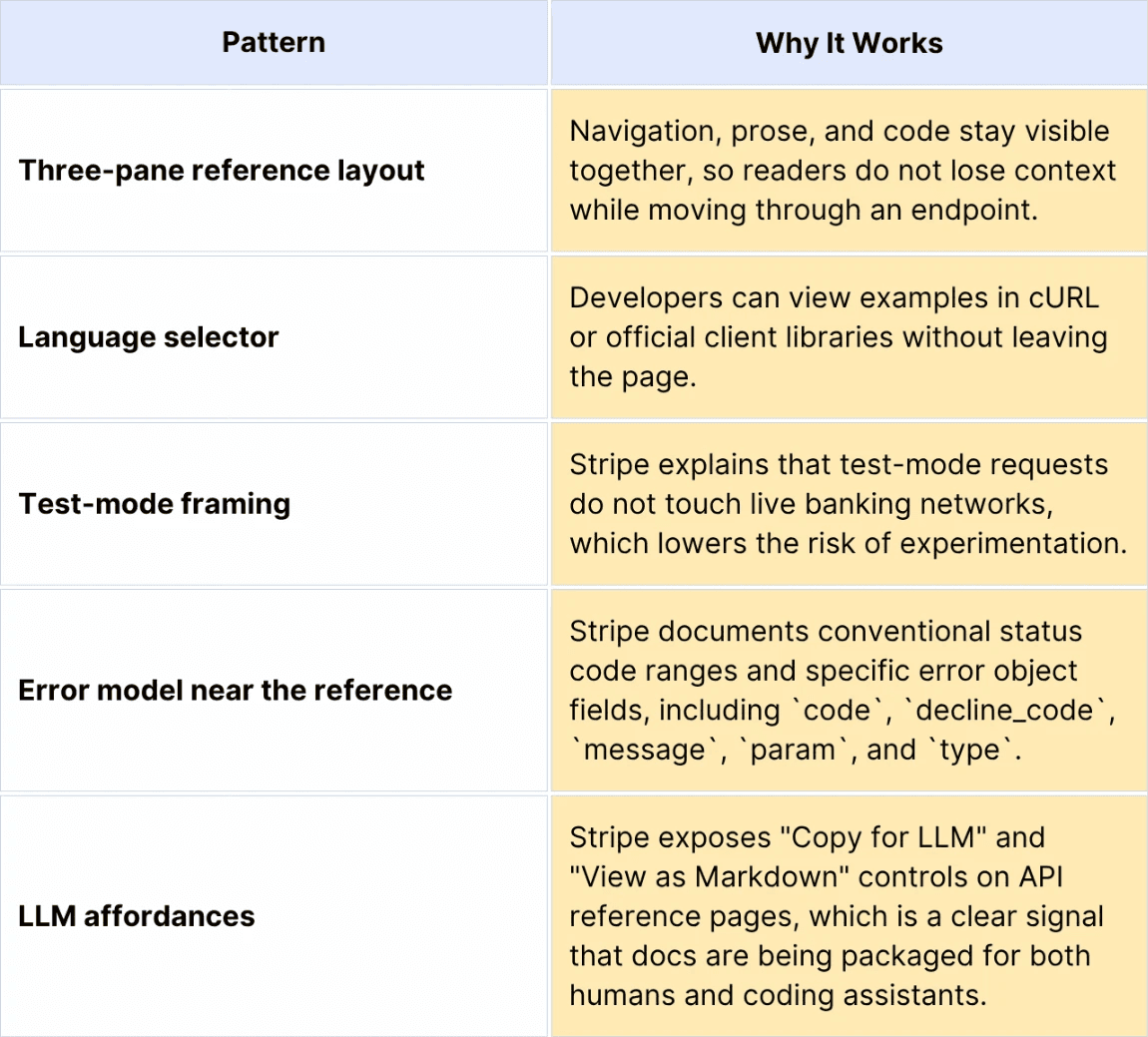
Pattern to borrow: Put the runnable request beside the explanation it belongs to. Developers should not have to assemble a working example from three disconnected pages.
Limitation to watch: Stripe's documentation polish is supported by years of custom investment. Most teams should borrow the structure, not try to recreate every interface detail from scratch.
2. Twilio API Docs: Best for Turning a Reference Page Into a Working Request
Twilio's Messaging API docs are strong because they treat API documentation as a path from "what is this resource?" to "send the message now."
The Messages resource page explains what the resource represents, then moves into specific operations such as creating, fetching, updating, and deleting messages. The create operation gives the exact endpoint, `POST https://api.twilio.com/2010-04-01/Accounts/{AccountSid}/Messages.json`, then explains the required recipient, sender, and content fields.
What stands out
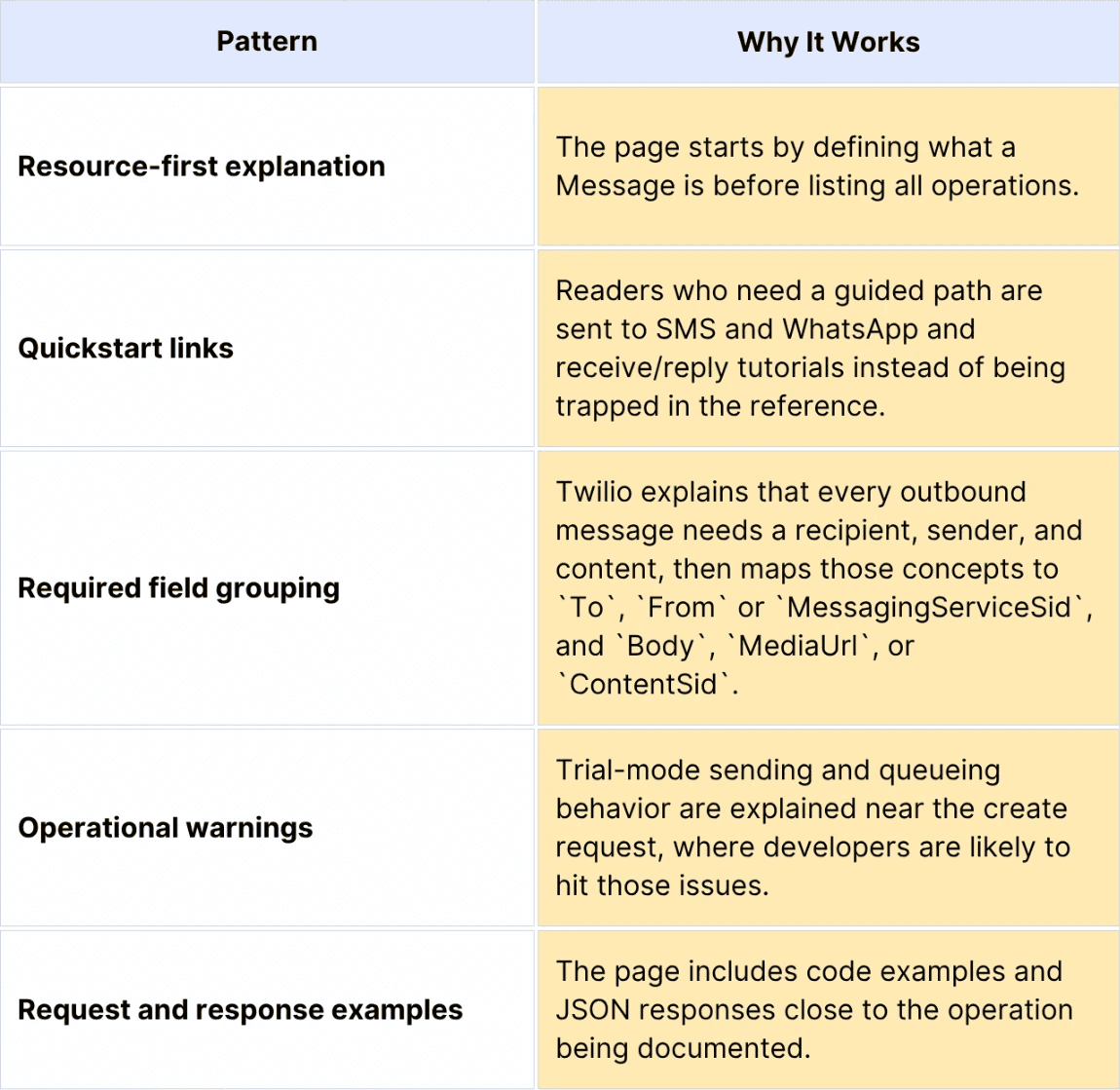
Pattern to borrow: Put real-world constraints next to the request that triggers them. A rate-limit note, sandbox warning, or trial-account restriction is more useful within the endpoint flow than buried on a separate policy page.
Limitation to watch: Twilio's product surface is broad. The same depth that helps committed users can feel heavy to beginners if they enter through the wrong page.
3. GitHub REST API Docs: Best for Permission and Parameter Precision
GitHub's REST API docs are worth studying when your API has many resources, many permissions, and many edge cases.
GitHub's getting-started guide explains that the REST API reference describes the HTTP method, path, and parameters for every endpoint. It also separates token options, including personal access tokens, GitHub App tokens, and the built-in `GITHUB_TOKEN` used in GitHub Actions.
What stands out
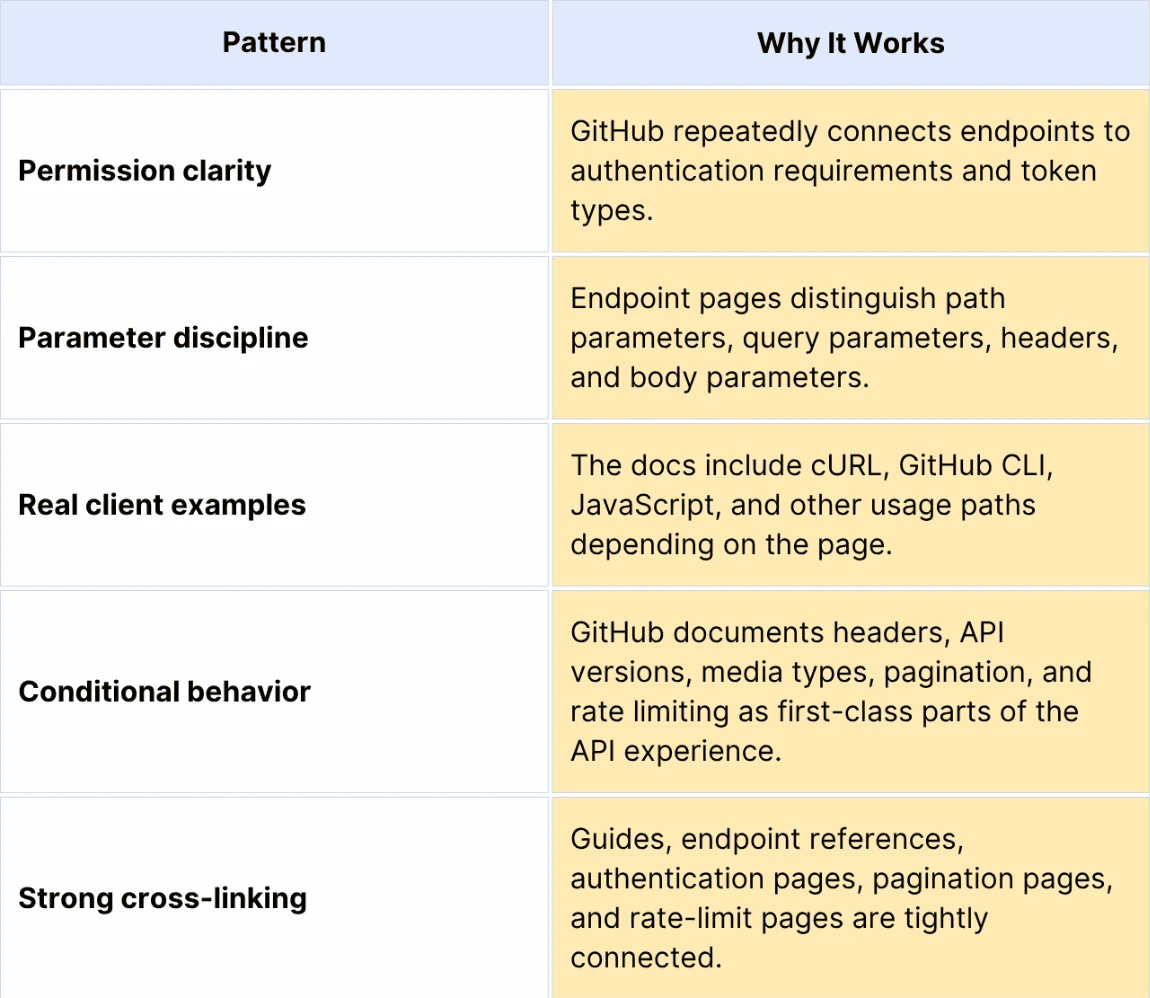
Pattern to borrow: Treat authentication and authorization as part of the endpoint, not a preface. If one endpoint requires a different scope, role, token type, or repository permission, show that right where the developer makes the request.
Limitation to watch: Exhaustive docs can become intimidating. GitHub offsets this with guides and examples, but teams with smaller APIs may not need the same level of detail.
4. Slack API Docs: Best for App-Centric Developer Onboarding
Slack's developer docs are strong because they frame the API around building an app rather than merely calling endpoints.
That matters because Slack integrations often span OAuth, scopes, events, webhooks, bot tokens, app configuration, and user-facing behavior. The Slack scopes reference and the OAuth installation guide help developers understand how permissions map to real app behavior.
What stands out
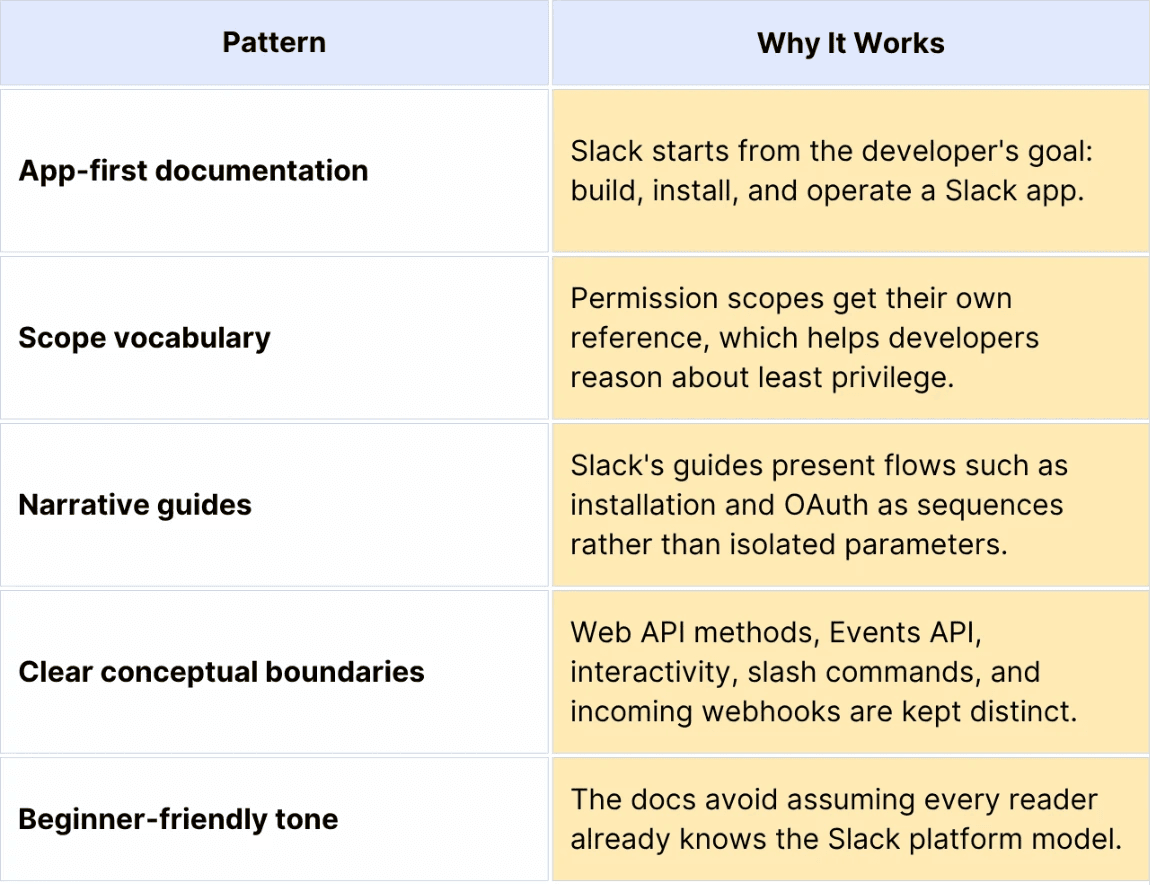
Pattern to borrow: If your API requires a platform concept before the endpoint makes sense, teach the concept first. For Slack, the concept is the app. For your API, it may be a workspace, tenant, account, project, environment, or connected user.
Limitation to watch: App-platform docs can sprawl quickly. Teams need strong navigation and lifecycle diagrams so readers understand which page is most relevant to their current task.
5. Google Maps Platform Documentation: Best for Tutorial-Led Navigation
Google Maps Platform documentation is useful because it supports many developer entry points: Maps, Routes, Places, Environment, Analytics, SDKs, APIs, samples, and tutorials.
The documentation homepage explicitly promises documentation, sample code, example apps, and product-specific learning paths. That breadth is the lesson. Google Maps is not one API; it is a platform of APIs and SDKs. The docs make that complexity easier by organizing around jobs such as building a first map, adding autocomplete, getting directions, styling maps, or working with Places.
What stands out
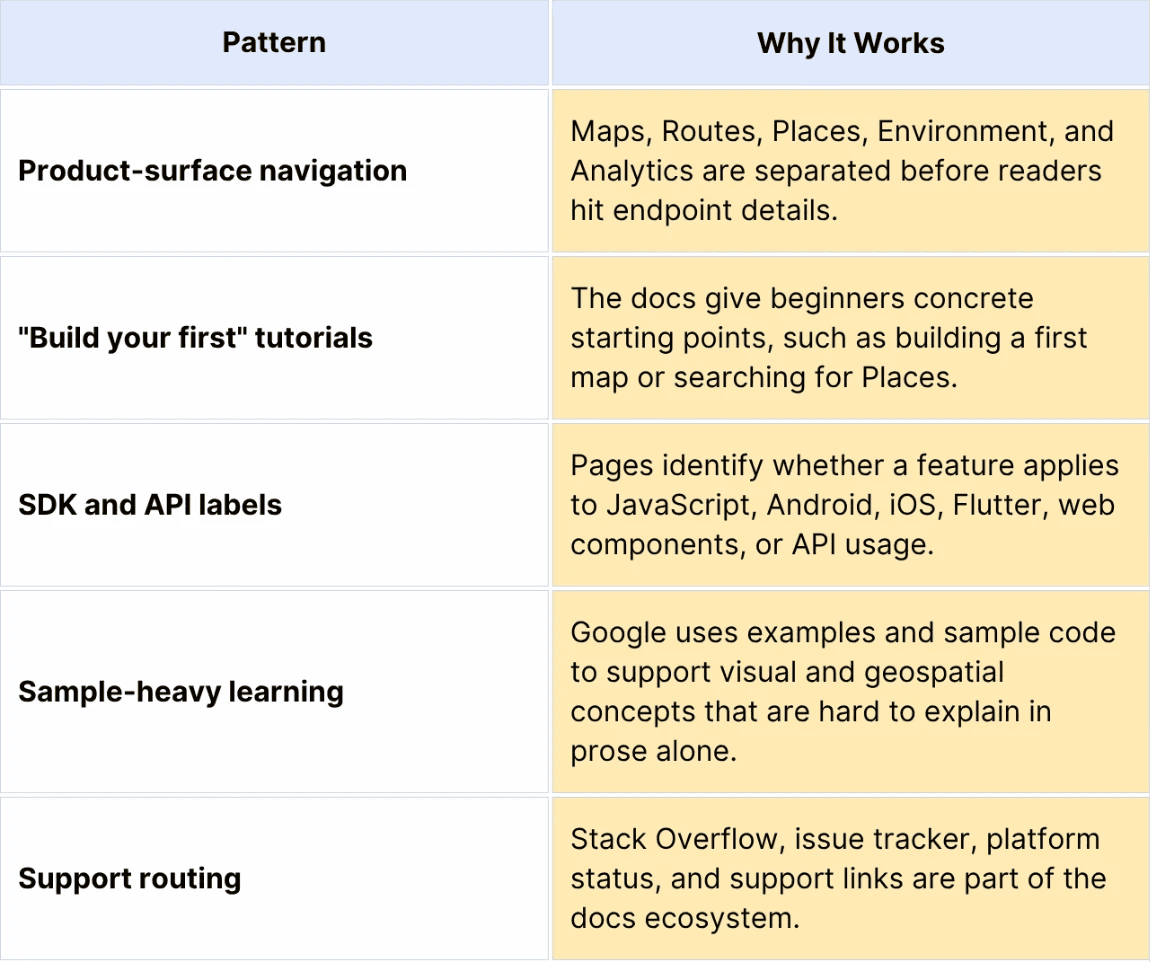
Pattern to borrow: For a multi-product API platform, do not force all users to use a single generic reference. Route them by job, product area, and implementation platform before they reach the endpoint.
Limitation to watch: Large product matrices can create choice overload. Strong search and "most popular docs" modules are essential when the docs surface gets this large.
6. Shopify API Docs: Best for Versioned Schema Clarity
Shopify's GraphQL Admin API reference is a strong example for teams documenting complex business objects, versioned schemas, and workflows that span many resources.
Shopify's Admin API lets developers build apps and integrations that extend the Shopify admin. The reference presents version choices, client libraries, cURL examples, and GraphQL-specific concepts. Shopify's help documentation also notes that Shopify releases new API versions every three months, which is exactly the kind of cadence that documentation needs to make visible for developers who maintain long-lived integrations.
What stands out
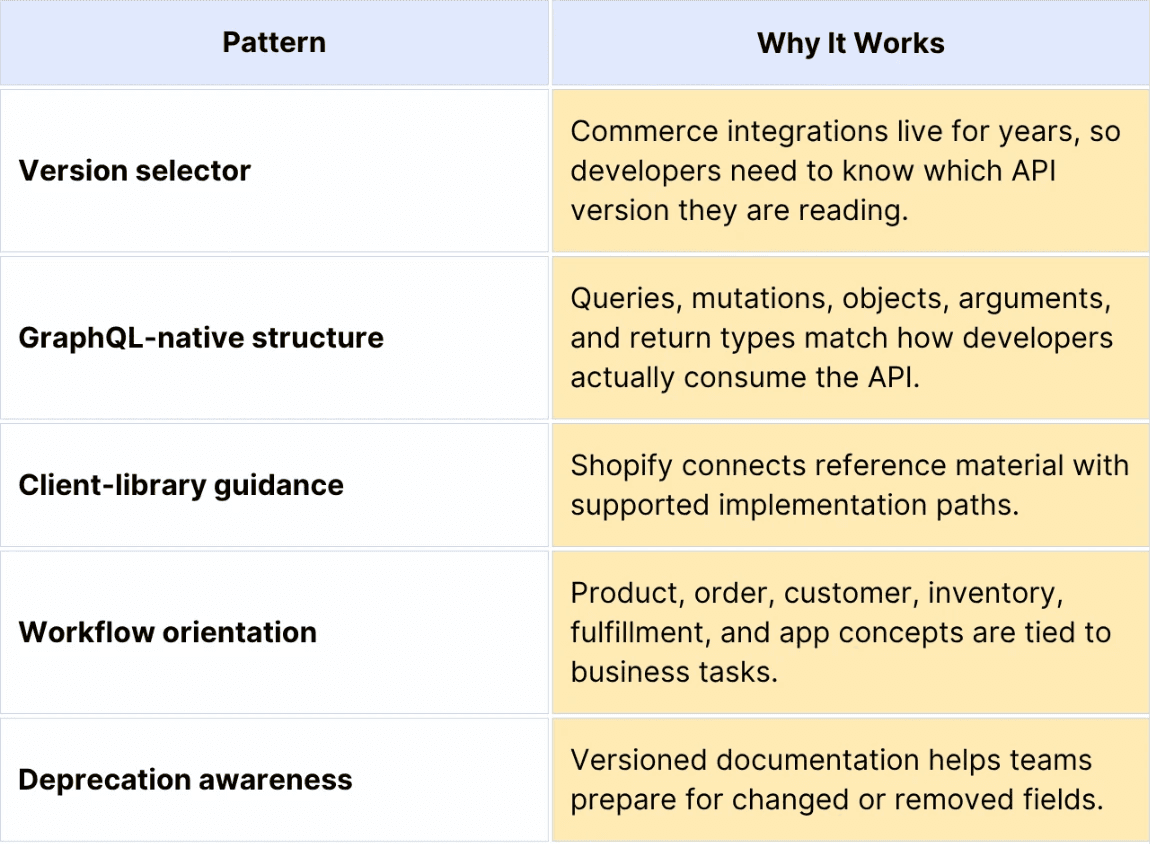
Pattern to borrow: If your API changes on a predictable cadence, make versioning visible in the reference. Do not make developers infer whether a field is current, deprecated, or only available in a later version.
Limitation to watch: GraphQL references can become schema encyclopedias. Teams need task-based guides that show which query or mutation sequence solves a real workflow.
7. Plaid Docs: Best for Safe Sandbox-First Onboarding
Plaid's Quickstart is a useful model for financial API documentation because it reduces fear before it increases depth.
Plaid asks developers to work with bank-like concepts, user authorization, sandbox environments, access tokens, Items, accounts, products, and webhooks. The quickstart starts in Sandbox, provides developers with a local app path, explains Plaid Link, and introduces the Item concept as a login to a financial institution.
What stands out
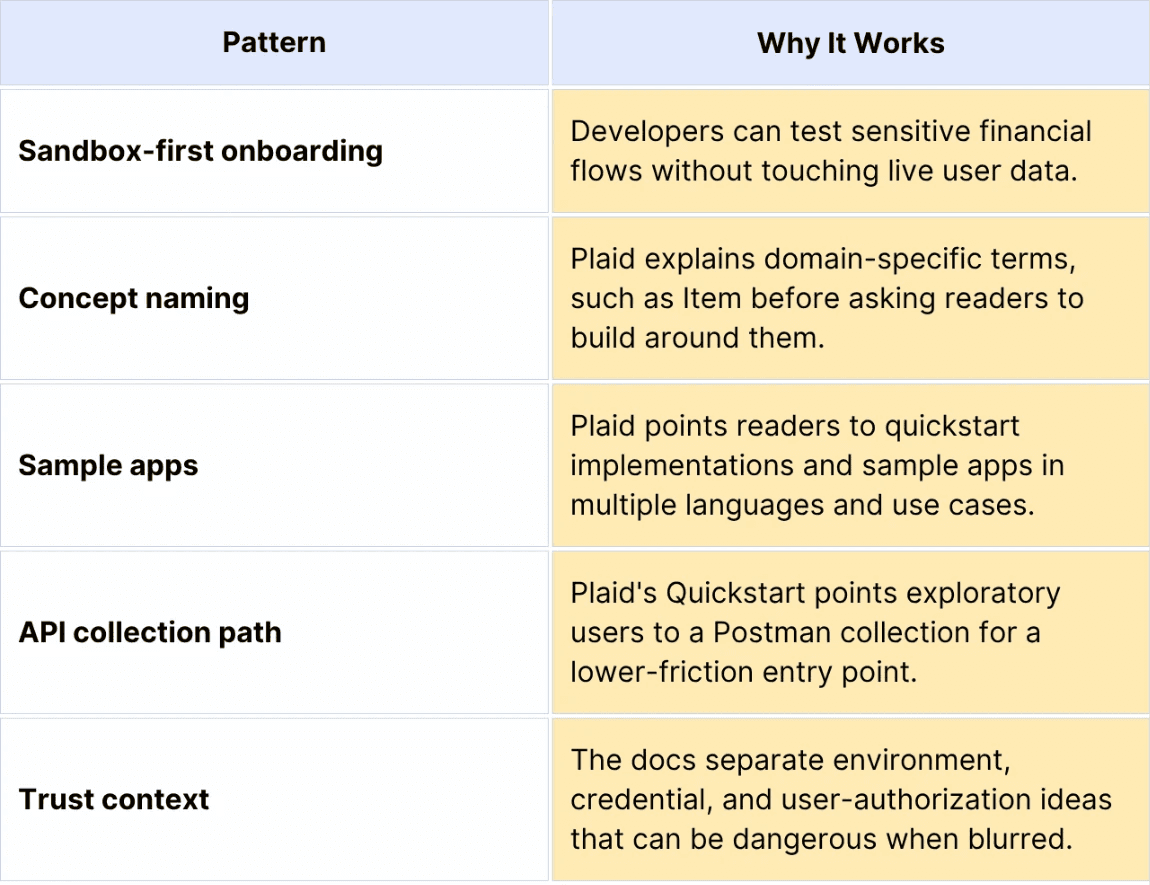
Pattern to borrow: For regulated or trust-heavy APIs, start with a safe environment and explain the security model before the reader handles real data.
Limitation to watch: Trust-sensitive flows need constant maintenance. If sandbox behavior, production approval, or consent flows drift from the docs, developers lose confidence fast.
8. OpenAI API Docs: Best for Configuration-Rich Examples
OpenAI's API docs are useful because they document an API where the "response" is not just data retrieval. Developers need to understand models, inputs, outputs, tools, structured outputs, streaming, state, SDKs, and safety constraints.
The Responses API reference describes the endpoint as an interface for generating model responses that supports text and image inputs, text outputs, stateful interactions, built-in tools, and function calling. That makes it a good example of documentation that connects reference material with conceptual guides.
What stands out
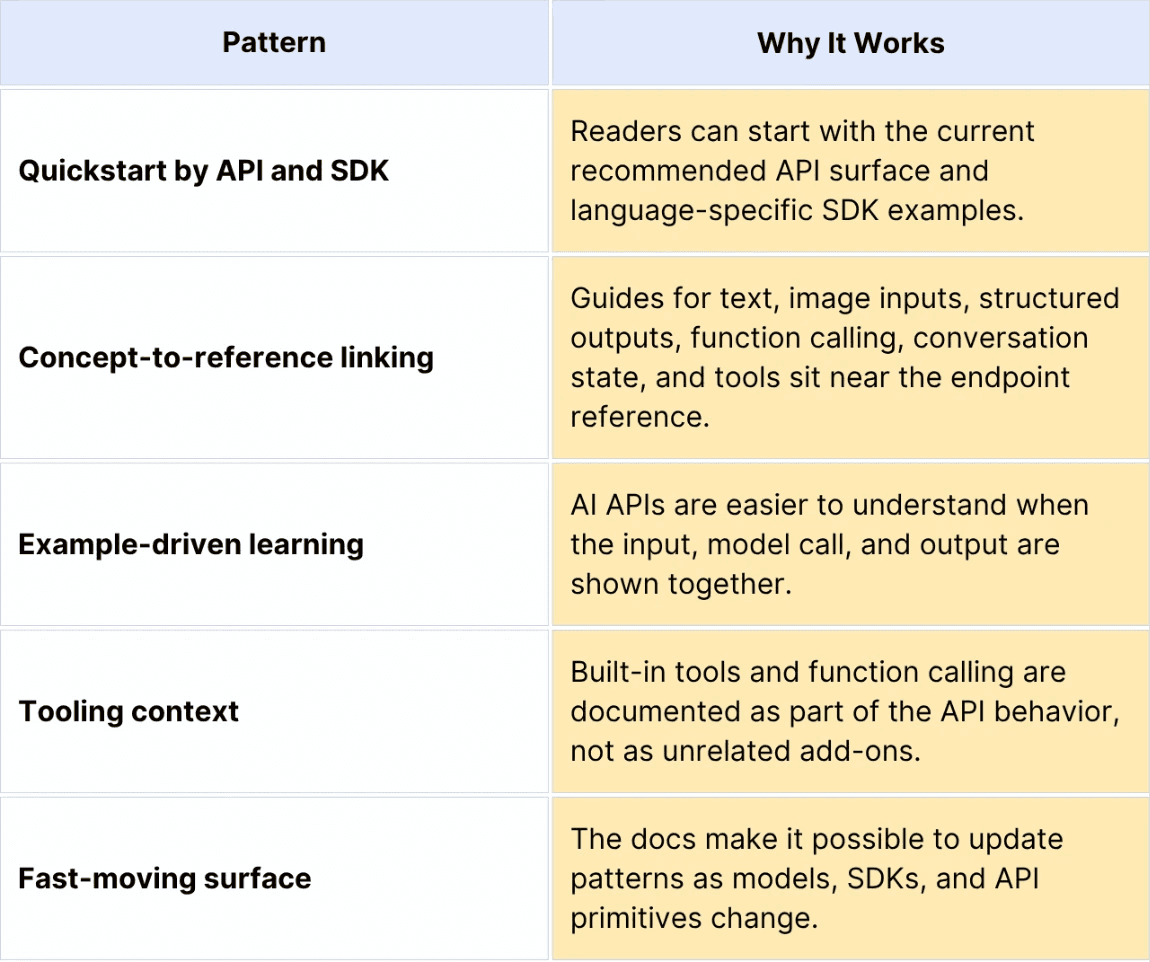
Pattern to borrow: When the API behavior depends on configuration choices, show complete examples. A model call with only a parameter table is rarely enough.
Limitation to watch: AI API docs age quickly. Teams documenting fast-moving APIs need clear versioning, migration notes, and examples that are tested against current SDKs.
The Qualities Worth Borrowing
Taken together, these examples point to eight documentation qualities worth copying:
Side-by-side endpoint usability
Request-generation flow
Permission and parameter precision
App-centric developer onboarding
Tutorial-led navigation
Versioned schema clarity
Safe sandbox-first onboarding
Configuration-rich examples
Those qualities matter more than the specific vendor examples. The goal is not to make your docs look like Stripe, Twilio, GitHub, Slack, Google Maps, Shopify, Plaid, or OpenAI. The goal is to make your own API portal easier to understand, test, trust, and maintain.
Why These API Documentation Examples Work
The best API documentation examples share a few repeatable patterns.
1. They Start With a Quickstart Before the Full Reference
A reference is for precision. A quick start is for momentum.
Stripe, Twilio, Plaid, OpenAI, Google Maps, and GitHub all give readers a way to make a first useful request before asking them to understand the entire product surface. That matters because API adoption often fails before the developer reaches the reference. A missing API key step, unclear sandbox setup, or confusing first token exchange can end the evaluation.
Borrow this pattern by writing a quickstart for the most common integration path. Keep it narrow: create a key, install the SDK or prepare cURL, make one request, inspect one response, and link to the next logical guide.
2. They Keep Endpoint Pages Predictable
A strong endpoint page answers the same questions every time:
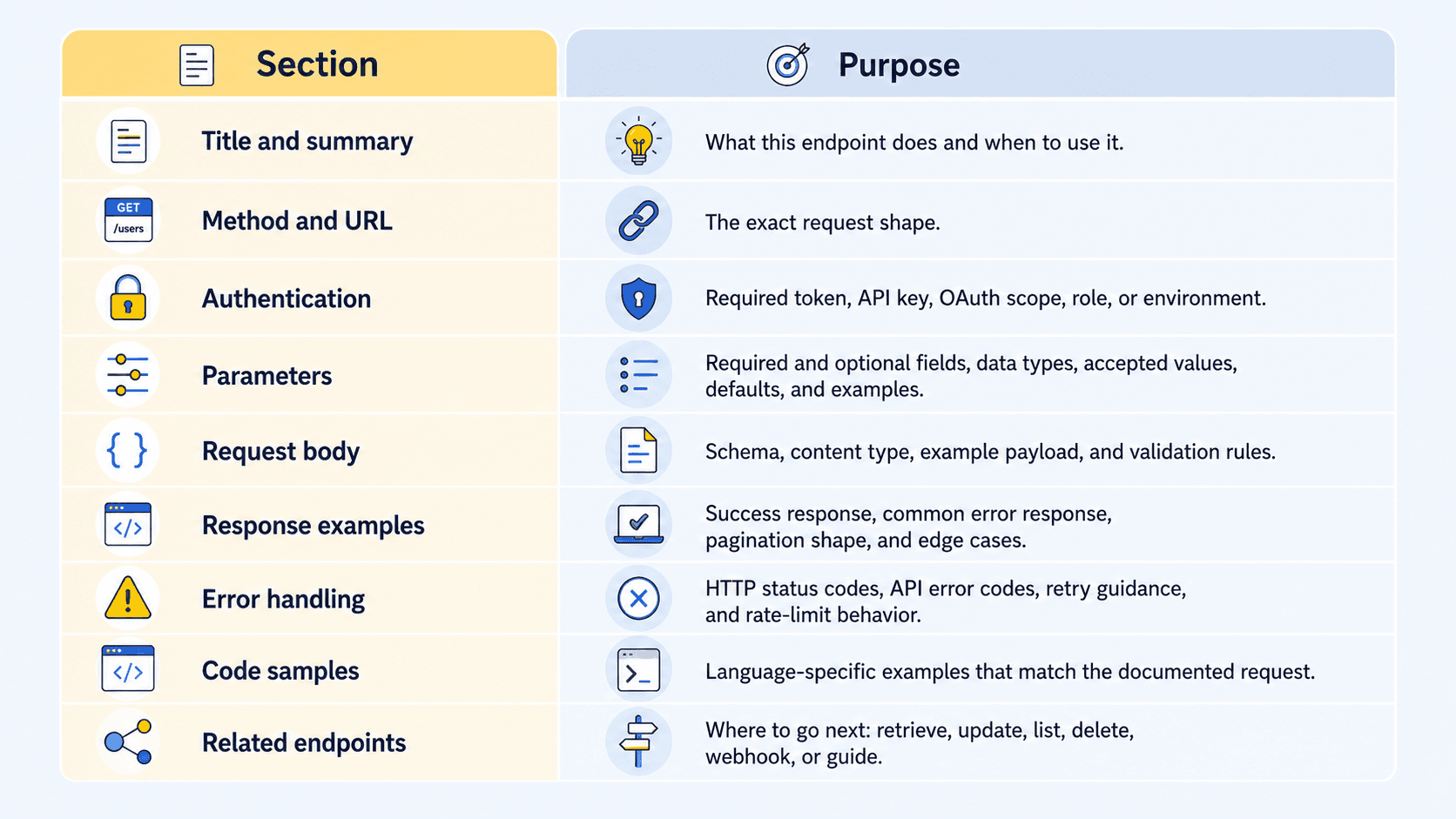
This is where Stripe, Twilio, GitHub, and Shopify are strongest. Their references may look different, but the reader can predict where key information will appear.
3. They Make Authentication Concrete
"Authenticate with OAuth" is not enough.
Strong docs explain which token is needed, where it comes from, what it can access, how long it lasts, which scopes apply, what environment it belongs to, and what error appears when it is wrong. Slack's scope reference, GitHub's token guidance, Plaid's environment model, and Stripe's API-key explanations are all good examples.
Borrow this pattern by adding an authentication box to every endpoint family. Include the required credential type, permission or scope, sample header, and the most common `401` or `403` failure.
4. They Show What Can Go Wrong
Good examples include errors, not just happy paths.
At minimum, API docs need to explain common `400`, `401`, `404`, and `429` failures. More mature docs show API-specific error objects, retry behavior, rate limiting, idempotency, validation failures, and webhook failure modes.
Stripe's error reference is especially useful because it explains conventional HTTP ranges and the fields developers can inspect programmatically. Twilio's operational warnings are useful because they sit near the request that triggers them.
5. They Connect Guides, Reference, SDKs, and Webhooks
API docs fail when the guide and the reference are separate worlds.
The best examples connect conceptual guides, endpoint pages, SDK examples, authentication docs, webhooks, and troubleshooting material. A developer reading a request example should be one click away from the guide that explains the workflow and the webhook that confirms the async result.
This matters even more for APIs where a single product flow spans several calls. Payments, commerce, mapping, financial data, Slack apps, and AI tool use all require more than one endpoint.
Once those patterns are clear, the practical question becomes simpler: what kind of tooling helps a real team build and maintain them without creating a custom documentation system from scratch?
Tools Used to Build Documentation Like These Examples
The famous examples are mostly custom or heavily customized. Stripe, GitHub, Google, Shopify, Slack, Plaid, Twilio, and OpenAI are not publishing from a default theme with a few settings changed.
For most teams, the practical question is not "what exact tool does Stripe use?" It is "which tooling gets us close to the same reader experience without building a docs engineering team?"
Common implementation paths include:
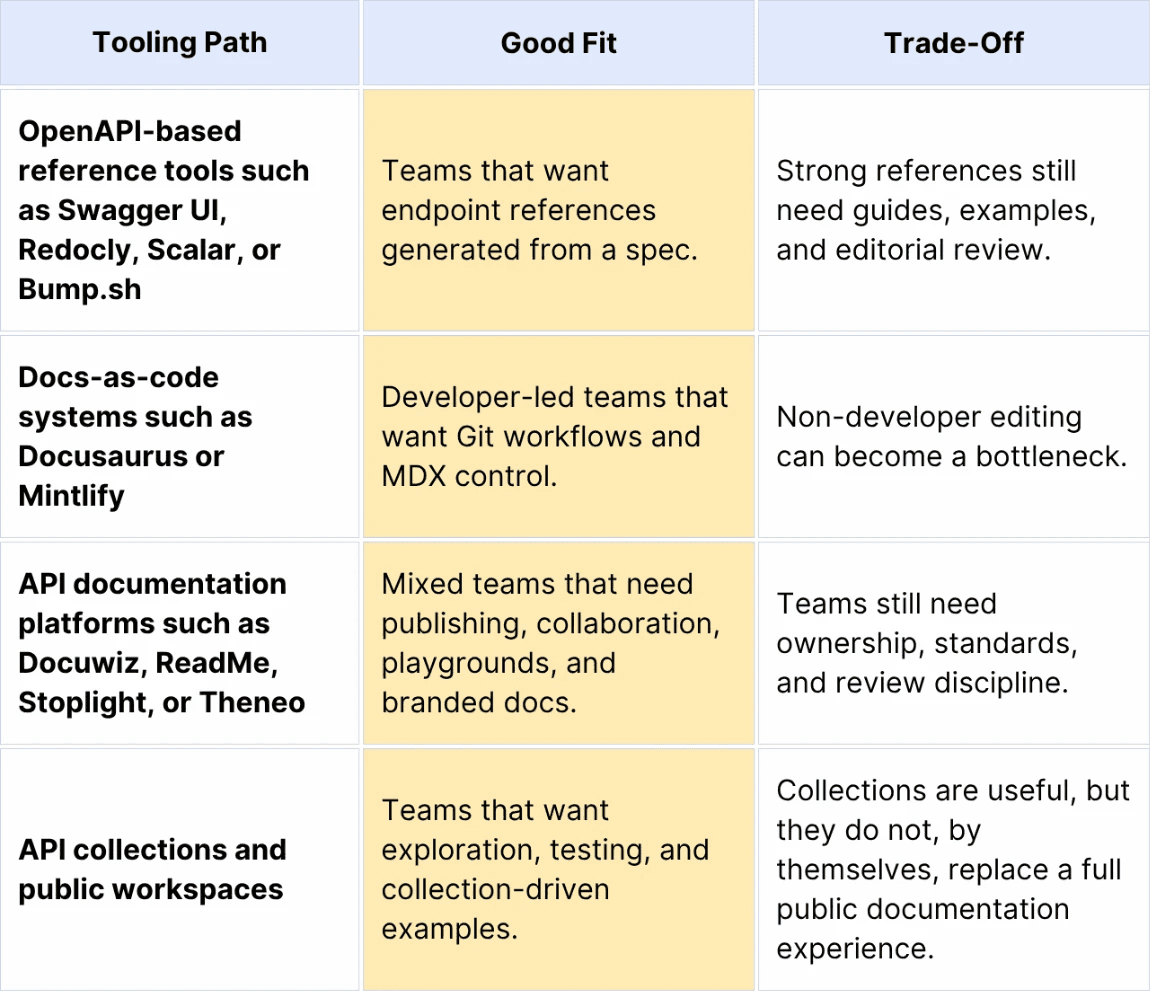
The best tool depends on who owns the docs. If engineers own everything, docs-as-code may be natural. If technical writers, DevRel, QA, product, and developers all contribute and you want to follow docs-as-code, Docuwiz is the more practical fit: it keeps API references tied to the spec while giving non-engineering contributors a visual guide editor, comments, revisions, source-control workflows, and a branded portal to work in.
How Docuwiz Helps Teams Build These Patterns Today
The eight examples above are useful because they reveal the key elements of a strong API portal: structured endpoint references, runnable examples, guided explanations, search, version control, collaboration, and a branded developer-facing site.
Most teams do not need to build all of that from scratch. Docuwiz is designed to help teams incorporate those portal patterns into their own documentation site from an OpenAPI-driven workflow, while still giving writers and DevRel teams room to improve the narrative around the API.
In Docuwiz, the documentation workspace is organized around guides, references, recipes, categories, settings, and a published portal. That matters because the best API portals are never just lists of endpoints. They combine reference pages with tutorials, task flows, onboarding guides, and discovery paths.
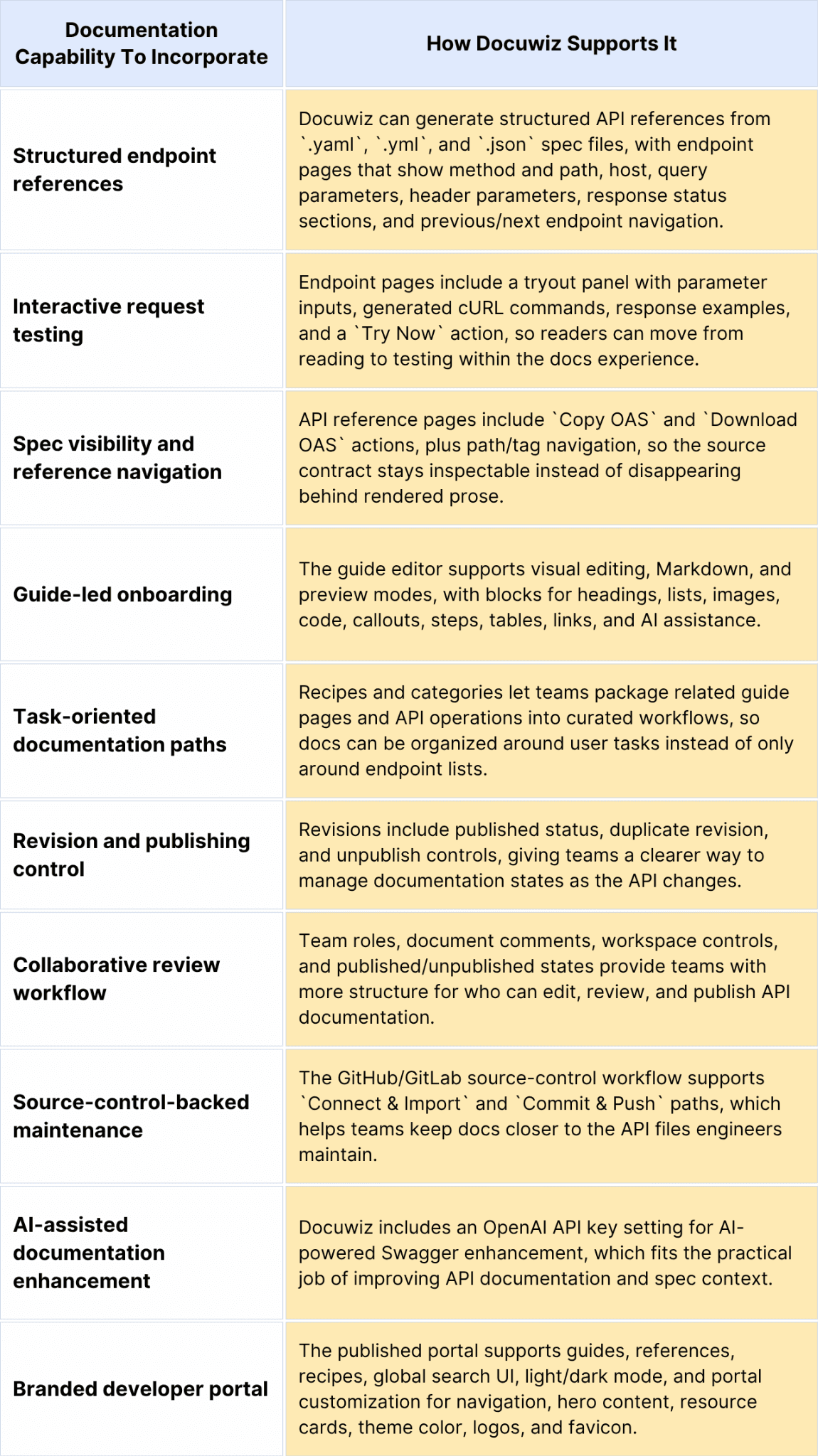
The strongest way to think about Docuwiz is not "a Stripe clone." It is a practical way to assemble the same ingredients that make great API portals work: spec-generated reference pages, readable guides, interactive endpoint testing, task-oriented recipes, revision controls, comments, source-control workflows, and a branded published site.
The important point is ownership. Better docs are not produced by a renderer alone. They come from a workflow where developers keep the spec accurate, writers improve the explanations, reviewers catch drift, and publishing controls keep the public docs trustworthy.
Documentation for Humans and AI Agents
API documentation is no longer read only by humans.
The Postman 2025 State of the API Report says 25% of respondents are already designing APIs or workflows for AI agents. The same report page also says 5% are actively moving from human-first to AI-first API design.
That does not mean human docs are obsolete. It means the best human docs are also better machine inputs.
AI coding agents benefit from:
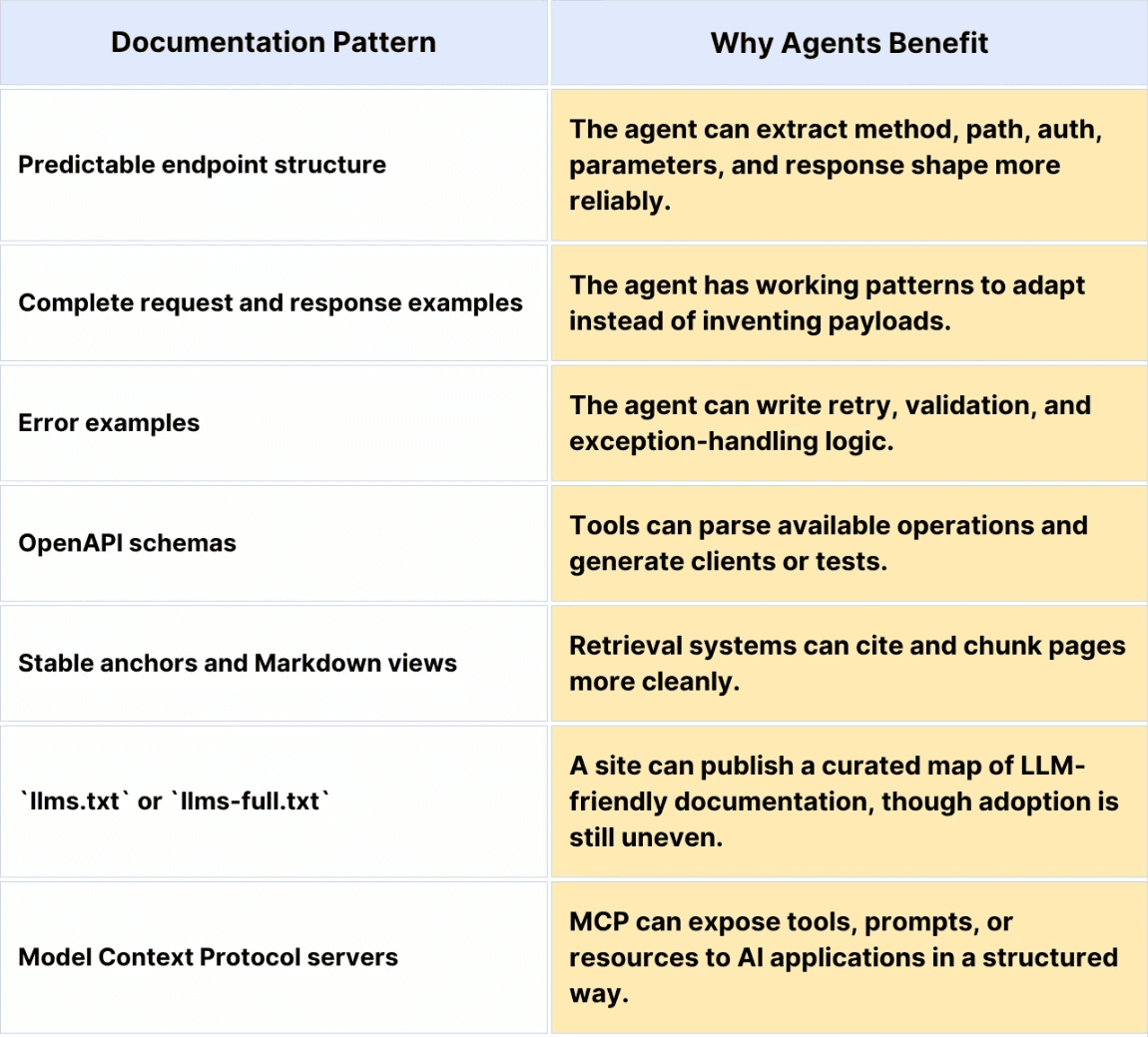
The OpenAPI Specification defines a language-agnostic interface to HTTP APIs that lets both humans and computers discover and understand service capabilities. That line is newly important in an agent-heavy world. It is no longer just about rendering a reference; it is about making the API surface reliable for tools.
The Model Context Protocol documentation explains MCP as an architecture for connecting AI applications with servers that expose context and capabilities. For API teams, the practical lesson is simple: structured documentation, schemas, examples, and tool descriptions are becoming part of the integration surface.
Treat `llms.txt` carefully. It is useful as an emerging convention for pointing AI systems toward important docs, but it is not a replacement for clean information architecture, accurate OpenAPI files, or tested examples.
Practical Checklist: Improve One Endpoint This Week
Pick one high-traffic endpoint and audit it against this checklist:
Does the page explain when to use the endpoint?
Is the method and URL visible without scrolling?
Are the required and optional parameters separated?
Does every parameter include type, description, and example?
Is there a complete request example in cURL and at least one SDK language?
Is there a realistic success response?
Are common `400`, `401`, `404`, and `429` failures documented?
Does the page link to the authentication setup?
Does the page link to rate limits, pagination, and webhooks where relevant?
Can a new reader test the request in a sandbox or playground?
Is the page structured well enough for a human reader and a coding assistant?
The best API documentation examples are not just attractive. They reduce uncertainty. Start there, and the design decisions become much easier to make.
FAQs
What is the best example of API documentation?
Stripe is still the most commonly cited example for side-by-side endpoint usability because its reference keeps explanation, parameters, and code samples close together. But "best" depends on the quality of the documentation you need to improve. Twilio is excellent for request generation; GitHub for permission and parameter precision; Slack for app-centric developer onboarding; Google Maps for tutorial-led navigation; Shopify for versioned schema clarity; Plaid for sandbox-first onboarding; and OpenAI for configuration-rich examples.
What are the key sections every API documentation page should have?
Every endpoint page should include a title, short description, HTTP method, and URL, authentication requirements, parameters, request body, example request, success response, common errors, rate-limit or pagination notes where relevant, SDK examples, and links to related guides or endpoints.
How do you write good examples for API documentation?
Write examples that match the real integration path. Use realistic values, show the full request, include the response, explain the required setup, and include at least one failure case. Avoid toy snippets that hide authentication, environment setup, or required fields.
What tools are used to create documentation like Stripe's?
The most famous API docs are usually custom or heavily customized. Most teams can get close with an API documentation platform such as Docuwiz, which helps turn OpenAPI specs into structured references, add guide content, support interactive endpoint testing, manage revisions and comments, and publish a branded developer portal. The tool matters, but the repeatable structure matters more.
How important is interactivity in API docs?
Interactivity is very important for evaluation and debugging. A playground, a generated cURL request, a sandbox, or an API collection lets developers confirm credentials, payloads, and responses before building a full integration.
How should API documentation handle authentication examples?
Authentication examples should show the credential type, header format, environment, required scopes or permissions, and the common errors caused by missing or invalid credentials. If OAuth is involved, include the authorization flow and token exchange path.
What makes API documentation beginner-friendly?
Beginner-friendly docs start with the developer's goal, define product-specific terms, provide a narrow quickstart, avoid unnecessary branching early, and link to deeper references only when the reader needs them.
How is API documentation changing for AI agents and coding assistants?
API docs are becoming inputs for AI coding agents. That makes predictable structure, complete examples, OpenAPI schemas, stable anchors, Markdown views, error examples, and machine-readable documentation more important.
What is llms.txt, and why does it matter for API docs?
`llms.txt` is an emerging convention for publishing a curated, LLM-friendly map of important site content. For API docs, it can help point AI tools toward quickstarts, references, schemas, and examples. It is useful only if the underlying docs are accurate and structured.
Related Reads
The Best API Documentation Tools in 2026
The Best GitBook Alternatives in 2026
Docuwiz product page: Live API docs from your spec
Written by
Team Docuwiz
Documentation Experts
The Docuwiz team helps developer-focused companies build documentation their users actually love — from API references to onboarding guides and everything in between.